


Imagine having a tool that not only turbocharges your customer interactions but also propels your sales team’s productivity to new heights. Introducing Freshsales, the online, cloud-based CRM that’s reshaping the sales landscape. With integrated phone and email features, user behaviour tracking, and lead scoring, Freshsales is more than just a CRM—it’s a sales powerhouse.
But here’s the game-changer: what if we told you that you could unlock Freshsales’ full potential and take it to the next level? That’s where the Google Workspace Marketplace steps in. By seamlessly integrating Freshsales with Gmail, you’ll not only streamline communication but also gain game-changing email tracking abilities.
In this article, we’ll unveil the ultimate combo—Freshsales and Gmail—and explore how it can revolutionize your sales potential. Get ready to sell smarter and close deals faster!
Why choose a sales CRM that integrates with Gmail?
Gmail is one of the most popular email services nowadays. If you want to efficiently manage your business communications and information while staying in your Gmail account, you need a CRM that seamlessly works with Google Suite.
Freshsales CRM for Gmail is specially designed for sales teams. It allows you to keep track of your emails and calendar events right within the CRM.
Here’s how it works:
✨ Two-Way Gmail Sync
When you send an email using either Gmail or Freshsales, the email is automatically saved in both places. Simply connect your Gmail account to Freshsales, and you can read, send, delete, and manage your emails from within Freshsales. Once connected, you have three options for managing your emails:
- Track when your emails are opened and clicked.
- Automatically create leads or contacts based on incoming emails.
- Link emails to specific leads or contacts.
✨ Two-Way Google Calendar Sync
You can sync your Google Calendar events with your sales CRM. This way, you’ll receive reminders, ensuring you never miss an appointment. The events are synchronized with “My Appointments & Tasks” in Freshsales and are linked to the respective lead or contact records and their associated accounts.

How to Use Freshsales Directly from Gmail
With the Freshsales Gmail add-on, users can conveniently access information about contacts within the web application directly from their Gmail interface. This valuable feature allows you to gather comprehensive insights about your prospects before initiating any interactions with them.
Here are the steps to add the Gmail add-on:
- Open your Gmail account.
- Click the icon that resembles a less-than symbol (<) to reveal the side panel.
- Next, click the plus icon (+) labelled “Get Add-on.”
- This action will take you to the Google Workplace Marketplace.
- In the Marketplace search bar, look for “Freshsales” and select it to install the add-on into your Gmail.
- Click on the Freshsales tile to access the Freshsales page on the Marketplace.
- Click the “Install” button and provide your Freshsales credentials to initiate the installation process.
- Once the installation is complete, you will notice the Freshsales logo appearing on the side panel of your Gmail. After installation, you will be prompted to grant Freshsales access to your Gmail account. Click the “AUTHORIZE ACCESS” button to proceed.
- From the dropdown menu, select “freshsales.io,” enter the domain name, and click “Sign in.”
- This will redirect you to a new page where you’ll need to authenticate access to your Gmail account.
- After successfully logging in, you will be returned to your Gmail account. The Freshsales add-on will automatically retrieve information related to the contact (if the contact is a part of Freshsales). If the email address is not already in Freshsales, you have the option to add it to your contacts by clicking the “ADD TO CONTACTS” button.

This streamlined process allows you to seamlessly integrate Freshsales with your Gmail, enhancing your ability to access and manage contact information effortlessly.
How to get Freshsales from Google Workspace Marketplace
With the Google Apps integration, you can log in to your Freshsales account directly from your Gmail. However, please note that this integration is only possible if you are the Account Admin for both Google Apps and Freshsales. Freshsales is available as a separate app in the Google Marketplace.
Here’s how you can integrate Freshsales with your Google Apps account:
- Log into admin.google.com or download the app from the Chrome Webstore.
*Note: You must have administrative privileges for both your Google Apps and Freshsales accounts to proceed.
- Click on “Manage Marketplace Apps.” You will see a list of all the apps you’ve added. Search for “Freshsales” and install the app. You’ll need to grant Freshsales access to some of your domain data.
- After the installation is complete, go to the app’s settings in the marketplace and click the “Launch app” button. A screen will appear, asking you to enter your Freshsales credentials to authenticate yourself. If you have a custom domain, you can enter your original Freshsales URL here.
- Once authenticated, you (and anyone else with an account in your Google Apps domain) will be able to sign into Freshsales easily directly from Gmail.
This integration streamlines access to Freshsales through your Google Apps account, making it more convenient for you and your team to use both platforms seamlessly.
For additional details and a step-by-step guide on utilizing the Freshsales Gmail Add-On, please refer to the official support page: Freshsales Gmail Add-On
How can Freshsales help you grow your business?
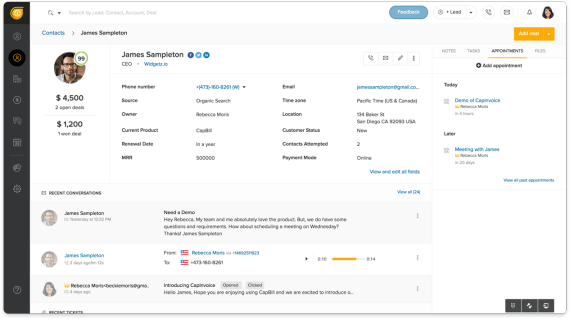
1. Expedite deal closures and enhance sales conversions by 50%.
As an artificial intelligence-powered sales CRM, Freshsales allows its users to leverage Freddy AI to concentrate on high-value deals that will boost their revenue. Gain insights spanning the entire sales funnel, from leads to revenue, with multi-touch attribution.
2. Foster relationships and increase revenue with a holistic customer perspective.
Achieve seamless engagement across various channels by gaining a complete 360° understanding of your customers. Bring together your sales and marketing teams to deliver exceptional customer satisfaction.
3. Accelerate deal closures by delivering precisely timed messages.
Sales and marketing collaboration is key to providing personalized customer journeys. Gain insights into customer intentions and send tailored messages to speed up deal closures.
4. Simplify IT operations and reduce costs with an all-inclusive solution.
Make your teams happy with an affordable, easy-to-implement, and user-friendly single solution. Boost adoption, cut expenses, and enhance team morale.
Final Thoughts
Freshsales stands as a remarkable software solution, offering numerous features and functionalities designed to empower businesses in their sales efforts. With its intuitive user interface, customizable dashboards, and robust reporting tools, Freshsales equips businesses with a highly effective way to streamline their sales operations and bolster revenue generation.
In fact, this powerful sales CRM enables businesses to fine-tune their sales strategies, elevate customer engagement, and hit their sales targets with precision. Its comprehensive feature set and user-friendly design make it an invaluable ally for any organization striving to amplify their sales performance and foster growth.
Additionally, when you combine Freshsales with the seamless integration of Gmail and Google Calendar through the Google Workspace Marketplace, you create a powerful sales tool that not only simplifies communication but also equips your team with advanced email tracking capabilities.
So, make full use of this ultimate combo to boost success. Don’t miss out on the opportunity to elevate your sales potential and achieve extraordinary results.
🚀 Skyrocket Your Sales with Exabytes!
Looking for a powerful CRM solution to manage your leads and grow your business? Check out Freshsales CRM from Exabytes! With Freshsales, you can easily manage leads, dive deep into deals, and analyze and forecast your sales with in-depth reports. Get started with us and amplify your sales potential today!
Boost Your Sales with Exabytes Freshsales CRM
Related articles:
Enhancing Customer Experience (CX) with CRM Software
How Customer Engagement Software Can Benefit Your Enterprises


