Home Blog Page 60

The Rise of .AI Domains: Perfect for the Technology and AI Sector

0

What is ai domain name

Ever pondered the synergy between AI and the technological realm?

Envision robotics, intelligent devices, and the marvel of artificial intelligence.

If you’re launching a digital platform, the allure of a .ai domain shouldn’t be overlooked.

Particularly for tech enthusiasts or scientific innovators, this domain extension might just be your perfect digital moniker.

Dive in to discover the resonance of an AI domain within the tech and AI ecosystem and the steps to secure this sought-after online badge.

Decoding the .AI Domain

Back in 1995, the .AI domain was unveiled as the unique internet signature for Anguilla, a Caribbean-based British Overseas Territory.

Traditionally, such domain extensions required a direct affiliation with their respective regions.

However, since 2009, the .AI domain has been universally accessible, akin to the ubiquitous .COM or .NET domain.

In contemporary times, the acronym ‘AI’ predominantly evokes “artificial intelligence” rather than its geographical origin.

Consequently, a plethora of entities have gravitated towards the .AI domain for their digital ventures.

Innovative minds have also harnessed .AI in inventive branding strategies.

Additionally, there’s a spectrum of variations available, including .COM.AI, .NET.AI, .ORG.AI, and more, offering a distinctive edge for emerging businesses seeking a standout online address.

Why the .AI Domain Resonates with the Tech and AI Sector

1. Elevate Your Brand’s Prestige and Reliability

Prominent tech giants have embraced .AI domains to fortify their brand persona.

Adopting this domain amplifies credibility, signaling your brand’s forward-thinking approach.

2. Ride the AI Wave

For businesses entrenched in AI, a .AI domain accentuates your niche.

It underscores your relevance in the burgeoning AI landscape, ensuring you’re distinctly recognized in a domain that’s currently in vogue.

3. Showcase Your Cutting-Edge Approach

Emerging startups and tech trailblazers with .AI domains underscore their commitment to pioneering solutions.

The .AI extension is perceived as a hallmark of contemporary, avant-garde ventures.

4. Engage with the AI Fraternity

Immerse yourself in the vibrant AI ecosystem.

Engage in meaningful dialogues, share insights, and foster connections.

This not only broadens your network but also augments potential revenue streams from your platform.

Comparing .com, .io, and .ai Domains

artificial intelligence (ai)

.com vs. .io Domains

The decision between .com and .io domains hinges on your website’s core purpose.

Historically, businesses and entities gravitated towards .com domains due to their established reputation and association with commerce.

Conversely, .io domains, initially representing the Indian Ocean territories, have now become favorites among tech startups and innovative ventures.

The “io” suffix subtly alludes to “input/output” in the technological realm, making it appealing to software enthusiasts and tech aficionados.

While .com domains exude a classic trustworthiness, .io domains project a futuristic, tech-centric vibe.

Ultimately, the selection boils down to the image the website aims to project and its target audience. Each domain carries its distinct flair.

Distinguishing Between .AI and .IO Extensions

Both .ai and .io domains resonate with the tech community, yet they cater to different niches.

Tech enterprises often opt for .io domains, given the tech jargon “I/O” synonymous with “input/output.”

In contrast, .ai predominantly appeals to entities immersed in artificial intelligence, a specialized tech segment.

For those outside the tech sphere, the allure of these domains lies in their brevity, making them succinct and memorable.

Their versatility also lends itself to inventive domain pairings, such as “portfol.io” for visual artists or “kor.ai” for aficionados of curry dishes.


Why Do AI Domains Carry a Premium Price?

AI domains are priced at a premium, attributed to their distinct branding appeal, limited availability, and resonance with the technological realm.

Their alignment with the burgeoning field of artificial intelligence amplifies their demand within the tech sector, subsequently elevating their market value.

Factors such as their concise, catchy nature, potential for innovative domain pairings, investment prospects, pricing tactics, and ongoing upkeep expenses further justify their higher cost.

Though they might be pricier than other domain alternatives, the benefits are tangible.

For entities in the AI or tech space, AI domains confer enhanced credibility, offering a unique brand identity and a competitive edge.

Is the .AI Domain Trustworthy?

When procuring a domain, there are stringent guidelines in place to ensure the authenticity and reliability of the registrant, safeguarding users who access websites under such domains.

For .ai domains, a minimum registration period of 2 years is mandated, though options to extend it for longer durations, such as 4, 6, 8, or 10 years, are available.

It’s crucial to be aware of the visibility of your data.

Registering a new domain necessitates the provision of personal details like name, address, and contact number.

This information is cataloged in the Whois database, which is publicly accessible.

In Conclusion

In our increasingly digital age, carving out a robust online identity is paramount.

Leveraging the prowess of AI, a .ai domain can elevate your stature in the technological realm.

Whether you’re a budding venture, a researcher, or a tech aficionado, this domain resonates seamlessly with your zeal.

Bear in mind, .ai isn’t merely an arbitrary suffix—it evokes thoughts of cutting-edge artificial intelligence and advanced tech.

Eager to stake your claim in the digital domain?

Don’t delay! Secure your ideal AI domain before it’s claimed by another.

Search Your AI Domain Name Here

Related articles:

Does the Domain Name Positively Impact Google’s SEO Ranking

Google’s BARD and OpenAI’s ChatGPT: Comparison between AI

Mastering the Chinese Market: Crafting Your Domain Strategy

0

domain name strategies for Chinese market

Considering a business expansion into Chinese market? Pondering the value of a .hk, .tw, and .cn domain?

You’re thinking in the right direction. Securing a .cn domain not only amplifies your footprint in China but also elevates your search visibility.

Unique to China, there’s no mandate for a local business registration to obtain a .cn domain.

This edge can significantly enhance your site’s performance on search engines like Baidu.

Dive into this guide as we unravel tactics to choose the perfect domain and optimize your entry into China’s vast landscape.

An Insight into Domains for China, Taiwan, and Hong Kong

Navigating the domain extensions for China, Taiwan, and Hong Kong requires an appreciation of their role in crafting a digital presence attuned to these unique markets.

The .cn domain stands out as a potent tool for the vast Chinese audience, enhancing both visibility and trust. For Taiwan, the .tw domain resonates with local pride and can bolster regional confidence.

On the other hand, the .hk domain is the go-to for businesses eyeing the vibrant Hong Kong market. Each domain offers distinct advantages, ensuring your online persona aligns with the tastes and anticipations of your desired audience across these varied locales.

Why is selecting the appropriate domain extension crucial for specific target markets?

China, with its unparalleled population size, presents businesses with an unmatched opportunity to grow and engage with a vast audience.

To optimize your site’s discoverability, especially on dominant Chinese search platforms like Baidu, it’s prudent to register a domain bearing the .CN suffix.

Such a decision communicates to search engines your site’s alignment with Chinese interests, making it more relevant to local searches. Consequently, you can expect a surge in Chinese web traffic, potentially amplifying your business’s revenue and profitability.

Exploring China’s Domain Extensions

China Mainland

.cn domain

The “.cn” domain is China’s unique digital signature. It’s the go-to choice for individuals, businesses, and groups operating in Mainland China.

To establish a strong online presence in China, adopting this extension is key.

.com.cn domain

“.com.cn” is a subset of “.cn” and is predominantly used by Chinese businesses. It mirrors the globally recognized “.com” but with a “.cn” twist, emphasizing its Chinese orientation.

It’s a preferred choice for enterprises engaged in e-commerce or those aiming to solidify their brand within China.

.net.cn and .org.cn domain

Both “.net.cn” and “.org.cn” fall under the “.cn” umbrella but cater to specific entities.

“.net.cn” is tailored for entities associated with networking, such as internet service providers, tech-centric organizations, and the like. “.org.cn” is the domain of choice for non-commercial entities, encompassing non-profits, community initiatives, and altruistic organizations.

.gov.cn and .edu.cn domain

“.gov.cn” and “.edu.cn” are reserved for distinct institutions in China. “.gov.cn” is exclusively for governmental bodies, spanning from the national to local levels, ensuring a clear distinction of official government websites from others.

“.edu.cn” is dedicated to educational institutions, be it universities, colleges, or schools, signifying a focus on academia.


Navigating Hong Kong’s Domain Extensions

.hk domain

The “.hk” domain serves as Hong Kong’s digital postcode. It’s the preferred choice for businesses and entities operating within Hong Kong.

.com.hk domain

“.com.hk” operates under the “.hk” umbrella and is predominantly adopted by Hong Kong businesses. It mirrors the universally recognized “.com” but concludes with “.hk”, emphasizing its Hong Kong-centric nature.

.net.hk and .org.hk domain

Both “.net.hk” and “.org.hk” are extensions of “.hk”, catering to specific sectors.
“.net.hk” is tailored for entities associated with networking, such as internet service providers or tech-driven initiatives.

“.org.hk” is the domain of choice for non-commercial entities, including non-profit organizations, community-centric clubs, and similar altruistic groups.


Taiwan’s Domain Landscape

taiwan city

.com.tw domain

“.com.tw” serves as a digital beacon for businesses operating in Taiwan. Companies aiming for a strong online presence in the region often opt for this extension. .net.tw and .org.tw

Both “.net.tw” and “.org.tw” cater to specific sectors within Taiwan. “.net.tw” is the go-to for entities focused on networking, encompassing internet service providers and tech-oriented ventures.

“.org.tw” is tailored for altruistic entities, including community support organizations, non-profits, and other like-minded groups.


Crafting a Domain Name for Optimal Impact in Chinese Market

Cultural and Linguistic Nuances in Domain Selection

Selecting a domain name for the Chinese market demands a deep appreciation of cultural and linguistic nuances. Chinese culture places significant emphasis on symbolism and phonetics.

Thus, it’s prudent to opt for a domain that resonates positively, aligns with your brand ethos, and is phonetically appealing.

Choose a name that’s easily pronounceable and memorable for the Chinese audience, facilitating word-of-mouth promotion. Incorporating commonly searched terms can also enhance your site’s visibility on Chinese search engines.

Brevity is key in Chinese communication, so a concise domain name is often more impactful. Striking the right balance between cultural reverence and linguistic clarity can significantly amplify your website’s appeal in China.

Guidelines for Selecting an Effective Chinese Domain Name:

  1. Embrace Brevity: Short domain names are not only catchy but also user-friendly. Aim for a maximum of two to three words.
  2. Prioritize Clarity: Ensure your domain is memorable and straightforward. Steer clear of intricate or rare terms that might pose pronunciation challenges.
  3. Incorporate Relevant Keywords: Embed terms that mirror your offerings. This not only boosts searchability but also provides immediate clarity about your site’s content. Consider adding geographical indicators for local relevance.
  4. Align with Your Brand: Your domain should be a reflection of your brand identity, fostering instant recognition and driving more traffic.
  5. Maintain Uniformity: Ensure consistency between your domain and brand name to avoid creating dissonance for your visitors.
  6. Aim for Excellence, Not Perfection: While it’s essential to have a strong domain, don’t get ensnared in the pursuit of perfection. The emphasis should be on building a robust brand presence with a competent domain name. The journey often holds more value than the starting point.


Is Purchasing a Chinese Domain Possible?

Yes, acquiring a Chinese domain is feasible, but there are specific guidelines to adhere to. Even if you’re based outside China, obtaining a “.cn” domain is possible through sanctioned domain sellers authorized to cater to international clients.

Ensure compliance with regulations set by the Chinese authorities or domain registry to ensure a legitimate transaction. Moreover, selecting a domain name that resonates with the Chinese culture and language is pivotal for optimal online traction in China.

Domain Registration Insights

A .CN domain can be secured for a duration ranging from 1 to 10 years. Permissible characters for .CN domains include letters a-z, numbers 1-9, and hyphens, though consecutive hyphens are prohibited.

The domain name should span at least 3 characters but not exceed 63 characters, excluding the .CN suffix. While Chinese residency isn’t a prerequisite for registration, specific documentation is mandatory:

For Individuals:

  • Residents of China: Options include ID card, residence booklet, driver’s license, or passport.
  • International applicants: A passport is required.

For Organizations:

  • Identification: Choices encompass National ID card, residence booklet, driver’s license, or passport.
  • Business Verification: Documentation like an organization code certificate or enterprise business certificate is essential.


Guard Against Deception!

Be wary of individuals or firms from China posing as accredited registrars or officials. They might insinuate that a third party is attempting to register a Chinese domain resembling your brand.

If you haven’t secured Chinese domains yet, it’s best to dismiss such communications and consider reporting them to CNNIC (https://www.cnnic.com.cn/).

Another prevalent ruse involves claims about your Chinese domain nearing expiration, coupled with requests for renewal fees. Remember, only your initial registrar is authorized to solicit renewal charges.

In case of uncertainties, cross-verify the registrar details, expiration timeline, and payment specifics with CNNIC (https://www.cnnic.com.cn/).

Stay vigilant against potential frauds.

Key Insights

Establishing a robust online footprint is crucial, particularly in a vibrant market like China. Think of your domain name as your digital storefront, influencing your brand’s visibility and reputation.

With a .cn domain, you gain seamless access to Chinese digital landscapes without the prerequisite of local business registration.

Whether you’re a budding venture exploring growth or a seasoned entity venturing into fresh grounds, perfecting your domain strategy is pivotal for success in the Chinese market.

Keep in mind, an aptly selected domain transcends being merely a URL – it’s a gateway to a plethora of business prospects.

Search Your Domain Now

Related articles:

The Role of ccTLDs in SEO to Build Credibility & Visibility

Does Domain Length Matter? Find The Best Domain Name

HK Domain: Stand Out in Hong Kong’s Competitive Online Market

0

what is hk domain name for Hong Kong

Carve your unique space on the vibrant Hong Kong Island using the dynamic HK domain.

From its inception during the British colonial era in 1990, the .hk extension has been an instrumental tool for digital triumph. Now, post the 1997 handover to China, businesses relish a dual-domain advantage featuring .hk and .cn extensions. This formidable fusion enables precision communication across diverse audiences, offering a distinct advantage to enterprises like Asia Business Centre.

As a prime illustration, this Hong Kong-rooted business solutions provider employs AsiaBC.co for English content, AsiaBC.com.hk for traditional Chinese (Hong Kong), and AsiaBC.com.cn for simplified Chinese (mainland China).

Embracing a .hk domain empowers individuals and businesses to not only stand out but also forge vital connections in the cutthroat Chinese market, ultimately paving the way for triumphant endeavors.

Hong Kong Domains: Explore the Variety of .hk, .com.hk, .net.hk, .org.hk Extensions

hong kong

.hk Domain Overview

The .hk domain serves as Hong Kong’s distinct Internet country code top-level domain (ccTLD), overseen by the Hong Kong Internet Registration Corporation (HKIRC). HKIRC, established in 2001, holds the exclusive authority granted by the Hong Kong Government to manage ‘hk’ domain names. While not vested with statutory powers, HKIRC operates as a non-profit, membership-driven entity.

A .hk domain symbolizes the digital identity for individuals, businesses, and organizations associated with the region. Recognized worldwide, .hk domains signify Hong Kong’s online presence.

Their applications are diverse, ranging from personal blogs to corporate ventures and non-profit initiatives. Subdomains under .hk cater to specific purposes:

  • com.hk for businesses
  • .net.hk for Internet Service Providers
  • .org.hk for non-profit organizations

Understanding .com.hk Domain

As Chinese internet users navigate the web, they often expect to come across .HK domain names. .COM.HK stands as a sub-domain specific to Hong Kong. Given the universal recognition of .COM domain names across various languages and regions, .COM.HK is a natural choice for Chinese entities and enterprises aiming to build a digital footprint.

Whether you’re a resident in China, an entrepreneur, an educator, or a sales aficionado, a .COM.HK domain is tailored for you. Adopting a .COM.HK domain boosts your visibility in local search results and fosters a closer connection with the local audience.

Understanding .net.hk Domain

Hong Kong, nestled within the vast expanse of China, maintains its unique national identity.

The .NET.HK domain extension is exclusively reserved for Internet Service Providers operating within this vibrant region.

Understanding Non-Profits with .org.hk

Part of the expansive .hk country code top-level domain, .org.hk is tailored for Hong Kong’s non-profit entities.

Charities, NGOs, and socially-oriented groups find their online niche here, conveying their altruistic mission and differentiating from commercial ventures.

.org.hk signifies dedication to community service, facilitating trust-building and connectivity with the intended audience.

The Value of Investing in a .hk Domain

A domain is pivotal in crafting your corporate identity. From solo entrepreneurs to multinational corporations, industry frontrunners choose the .hk domain when operating in Hong Kong. This decision transcends mere geographical representation. Flaunting a .hk domain accentuates their brand, drawing allegiance from both the local populace and global stakeholders.

It also acts as a badge of credibility, with many placing higher trust in businesses that sport the .hk suffix over other domain options. Additionally, leveraging the .hk domain can bolster your search engine positioning, amplifying site visibility and potentially boosting your business’s revenue.

6 Benefits of Using a Local Domain Extension for Hong Kong Enterprises

enterprise business cooperate together

Language Indication

A local domain extension, like “.hk”, often hints at the website’s primary language.

In Hong Kong’s context, this could be traditional Chinese or English, the region’s predominant languages.

Regulatory Adherence

Certain regions have distinct domain registration guidelines.

Opting for a local domain extension ensures businesses remain compliant, sidestepping potential legal complications.

Localized Marketing Strategies

With a local domain extension, businesses can craft marketing initiatives tailored to a particular demographic, encompassing unique promotions, events, or content designed for the local audience.

Local Business Connections

Sporting a “.hk” domain can pave the way for networking within the Hong Kong business ecosystem, facilitating collaborations with local enterprises, industry associations, and pertinent stakeholders.

Enhanced Recall

For local clientele, a regional domain extension can make a website’s address more memorable, potentially boosting direct traffic as users can effortlessly recall and input the domain.

Community and Economic Engagement

Showcasing dedication to the local market and supporting regional enterprises can strike a chord with consumers who value patronizing local businesses.


Understanding the Nuances: .hk vs. .com.hk

The primary variance between .hk and .com.hk revolves around their intended use and eligibility for registration. .hk stands as Hong Kong’s country code top-level domain (ccTLD) and is open for registration by individuals and organizations residing in Hong Kong.

On the other hand, .com.hk operates as a second-level domain beneath .hk, reserved solely for businesses and commercial ventures in Hong Kong. This subdomain is predominantly adopted by firms aiming to solidify their online business footprint in the region.

To encapsulate, while both domains resonate with Hong Kong, .hk represents the overarching ccTLD, and .com.hk is fine-tuned for business endeavors.

How to Secure Your .hk Domain?

Whether you’re based locally or internationally, you can directly acquire .hk domains.

However, the .com.hk extension is exclusive to businesses officially registered in Hong Kong.

Therefore, the straightforward registration of a .hk domain is often the preferred choice.

In Brief

Seize the digital opportunities that the HK domain presents on the electronic shores of Hong Kong Island. Claiming this virtual territory is akin to establishing a presence in China’s vibrant heartland.

When contemplating an HK domain purchase, recognize its value beyond just a label – it’s a tactical decision. With the dual-domain edge, you can seamlessly appeal to both the distinct Hong Kong demographic and the expansive mainland China market.

Whether you’re a budding venture or a seasoned enterprise, an HK domain might be your gateway to prominence and success in Hong Kong’s dynamic landscape.

Find Your Domain Now

Related articles:

Does Domain Length Matter? Find The Best Domain for Your Website

Premium Domain Names: Is It Worth Investing in One?

The Role of ITSM Solution in Boosting Employee Experience

0

ITSM solution to enhance employee experience

In today’s fast-paced digital world, the role of Information Technology Service Management (ITSM) has never been more crucial.

As organizations strive to deliver seamless experiences to their employees, ITSM solution emerges as a linchpin, ensuring that technology serves as an enabler rather than a hindrance.

ITSM Explained

Information Technology Service Management, commonly known as ITSM, is not just about managing IT services.

It’s about ensuring that these services align with the needs and objectives of the organization, and more importantly, with the expectations of its employees.

In essence, ITSM bridges the gap between IT and its users, ensuring that technology truly enhances the employee experience.

The Core Benefits of ITSM Solution to Employee Experience

On one side, the overarching advantages of ITSM contribute to enhancing employees’ perceptions of IT service delivery and support.

This includes elevating the service and support quality while accelerating the resolution and provisioning processes. It also emphasizes continuous enhancement.

When your organization integrates ITSM capabilities into other departments, like HR, the incorporation of ITSM principles and a tailored ITSM tool results in superior employee experiences and results.

This is particularly true when standardized processes are combined with automation, knowledge management, self-service, and the capabilities of reporting and analytics.

Here’s the impact of ITSM on elevating the employee experience:

  1. Efficient Issue Resolution: One of the primary frustrations employees face is when technology doesn’t work as it should. ITSM frameworks, with their structured processes, ensure that when technical issues arise, they are addressed promptly. This not only minimizes disruptions but also reduces the frustration levels of employees, allowing them to focus on their core tasks.
  2. Faster Service Delivery: In an age where time is of the essence, waiting for IT support can be agonizing. ITSM emphasizes the importance of timely service delivery. Through streamlined processes and standardized channels, employees can expect quicker response times, ensuring that their workflow remains uninterrupted.
  3. Self-Service Capabilities: The modern employee values autonomy. Many ITSM solutions recognize this and offer self-service portals. These platforms empower employees to find solutions, troubleshoot issues, and even submit requests without external assistance, promoting a sense of independence and efficiency.
  4. Proactive Problem Prevention: Reactive solutions are often more costly and time-consuming than proactive ones. ITSM’s proactive approach involves continuous monitoring and management of IT systems, identifying potential issues before they escalate, thus minimizing downtime and the associated frustrations.
  5. Clear Communication: Nothing is more unsettling than being kept in the dark, especially concerning IT disruptions that directly impact one’s work. Effective ITSM ensures transparent communication about service disruptions, maintenance schedules, and updates, allowing employees to plan their tasks accordingly.
  6. Continuous Improvement: The world of IT is ever-evolving, and so are the needs of employees. ITSM frameworks are designed to adapt. They encourage organizations to continuously assess and refine their IT services, ensuring that they remain aligned with employee needs and expectations.
  7. Personalized Support: Not all departments have the same IT requirements. ITSM solutions recognize the unique needs of different teams, ensuring that the support provided is tailored, enhancing overall satisfaction levels.
  8. User Training and Onboarding: The first impression lasts. For new employees, how they are introduced to an organization’s IT systems can set the tone for their entire journey. ITSM solutions ensure that new hires are equipped with the necessary knowledge and tools from day one.
  9. Remote Work Support: The recent surge in remote work has brought with it a unique set of challenges. ITSM solutions have risen to the occasion, ensuring that remote employees have seamless access to IT services, ensuring a consistent experience regardless of their location.
  10. Feedback Incorporation: Feedback is the cornerstone of improvement. ITSM frameworks prioritize feedback collection, ensuring that the voice of the employee is heard and acted upon, leading to services that truly resonate with their needs.


Why is Employee Experience Crucial in the IT Field?

Employee experience is not just an HR buzzword; it’s a critical business metric. A positive employee experience directly correlates with increased productivity, lower turnover rates, and even improved customer satisfaction.

In the realm of IT, where employees interact with technology daily, the significance of their experience is amplified. A seamless IT experience can be the difference between an engaged, productive employee and a frustrated, disengaged one.

The Five Phases of Employee Experience

From the moment a potential employee interacts with an organization’s IT systems during the recruitment phase, to their eventual exit, ITSM plays a pivotal role. During onboarding, a positive IT experience can set the tone for the employee’s journey.

As they move to the development phase, their IT needs might evolve, and ITSM ensures that these needs are met. Even during the exit phase, a smooth IT experience can leave a lasting positive impression, turning a departing employee into a brand ambassador.

  1. Recruiting: The employee experience begins even before an individual becomes an official employee. From accessing vacancy information to the portrayal of the company on social media, every touchpoint matters.
  2. Onboarding: First impressions count. Ensuring that new hires have everything they need from day one is crucial for setting the tone for their tenure.
  3. Development: Employees view their roles not just as jobs but as careers. Providing opportunities for growth and development is essential for a positive employee experience.
  4. Retention: Various factors, both external and internal, influence an employee’s decision to stay with an organization. Ensuring a positive experience can mitigate the risk of turnover.
  5. Exit: The manner in which an employee exits an organization can influence their overall perception of their tenure. A positive exit experience can lead to them becoming brand ambassadors, while a negative one can have the opposite effect.


Enhancing Employee Experience with Freshservice ITSM Solution

Come aboard to unlock operational efficiency, elevate customer satisfaction, and streamline IT processes through the power of effective IT Service Management (ITSM).

Join us to unlock operational efficiency, enhance customer satisfaction, and streamline IT processes with effective IT Service Management (ITSM).

Join us to explore how Freshservice can assist you in smart cost savings while maintaining the essence of value in IT Service Management (ITSM).

Sign Up Now

Freshservice ITSM is an outstanding tool tailored for in-depth IT Services Monitoring.

Hosted in the cloud, this IT support and service management platform is crafted to optimize IT operations for organizations. It boasts features such as a ticketing system, a self-service portal, and a comprehensive knowledge base.

1. Streamlined Operations with Robust Automations:

Freshservice ITSM is designed to eliminate the mundane and repetitive tasks that often bog down IT teams. By automating manual processes, it not only boosts the productivity of your IT team but also ensures quicker and more efficient service delivery to employees.

With no-code workflows, even complex processes can be automated seamlessly, ensuring that employees receive timely and accurate support.

2. Smart Decision-making with Intelligent Service Management:

Freshservice’s enterprise-grade AI engine, Freddy, empowers the service desk to make informed and intelligent decisions. This means faster resolution times, predictive support, and personalized experiences for employees.

The result? A more satisfied and engaged workforce that can rely on a service desk that’s always a step ahead.

3. Scalability and Integration with an Extensible Platform

Freshservice ITSM is not just a standalone solution; it’s a platform that grows with your organization. With out-of-the-box connectors, SDKs, and API configurations, it integrates seamlessly with other tools and platforms.

This ensures that as your organization scales and evolves, your IT service management remains consistent, efficient, and aligned with the needs of your employees.

The integrated Marketplace and Neo Platform further provide a plethora of options to customize and extend the capabilities of Freshservice, ensuring a holistic and enhanced experience for all employees.

Conclusion

In conclusion, ITSM solution is not just a set of processes and tools. It’s a philosophy, one that places employees at its core.

As organizations navigate the complexities of the digital age, an effective ITSM solution, one that truly boosts the employee experience, will be their guiding star, ensuring that technology remains an enabler, driving organizational success.

Elevate Your Employee Experience! Dive into our modern and intelligent ITSM solution, designed for instant value and effortless usability. Don’t just manage – excel. Discover the future of service management today!

Explore Our ITSM Solution Now

Related articles:

Learn About ITSM Tools for High-Performance Businesses

Service Desk vs. HelpDesk vs. ITSM: What is the Difference?

Exabytes & Alibaba.com Dream Trip Aug 2023

0

Exabytes x Alibaba.com Dream Trip Aug 2023, successfully completed.

alibaba.com dream trip hotel registration
Day 1: Alibaba.com Registration Centre

Last week, an exciting journey took place that combined business insights, cultural exploration, and innovation. From August 14th to 17th, 2023, around 40 participants embarked on a remarkable dream trip to Hangzhou, China.

Packed with enlightening experiences, the trip provided an exclusive look into Alibaba.com Group’s world and its advanced digital export strategies.

alibaba.com dream trip question and answer session during the trainning
Q&A time with our expert speaker

Alibaba.com innovative mindset & strategies

The goal of this distinctive journey was evident is to provide a profound comprehension of Alibaba.com‘s innovative mindset and digital export strategies.

Designed with a business-focused approach, the journey aimed to fully engage participants in international trade through Alibaba.com’s advanced platforms. The main objective is to empower B2B businesses with better platform choices.

The journey began at Alibaba.com’s global headquarters, where participants were introduced to an atmosphere of innovation.

With more than 10 tailored courses as the core part of the trip, attendees gained insights from 5 influential global lecturers, each with vast experience in e-commerce and business growth strategies.

alibaba.com dream trip to visit alibaba success supplier in China
Visits Alibaba Success Supplier

Throughout the four-day adventure, participants enjoyed a range of highlights. They explored the Alibaba.com headquarters and learned during visits to Chinese Supplier (CGS) companies.

The journey into business insights was complemented by a valuable one-on-one session with a successful Alibaba.com seller. As the days unfolded, participants not only learned about digital export but also experienced Hangzhou’s culture and vitality firsthand.

However, the trip’s impact extended beyond the insightful sessions. The journey revealed unforgettable moments that deepened participants’ understanding of Alibaba.com’s core mission and vision.

With a mission “To make it easy to do business anywhere,” Alibaba.com envisions a future where customers engage within the Alibaba.com Group ecosystem.

The ambitious 2036 vision aims to serve 2 billion global consumers, empower 10 million businesses, and create 100 million jobs.

alibaba.com dream trip group sharing session with savannah zheng
Group sharing time with Ms Savannah Zheng

As the sun set over the lively city, participants reflected on the journey’s significance. From Alibaba.com Group Headquarters to Hangzhou’s bustling streets, the dream trip became a hub of knowledge, connection, and inspiration.

Beyond digital export insights, the trip showcased Alibaba.com’s dedication to shaping the future of global business.

Ultimately, this dream trip wasn’t just about the physical journey; it was an exploration of collaboration, transformation, and innovation.

From the shining Alibaba.com towers to the conversations exchanged, each moment brought the realization of Alibaba.com’s vision for lasting success.

alibaba.com dream trip dinner
Joyful moment

This exceptional voyage reminded us that business isn’t confined to boardrooms; it’s a dynamic blend of cultures, ideas, and innovations. The Alibaba.com Experience became an unforgettable journey, inspiring a new generation of entrepreneurs to dream big and strive for more.

alibaba.com dream trip
Alibaba.com Dream Trip

Dream Trip Package:

✈️ RM9152 for one pax
✈️ RM9952 for twin sharing

For any inquiries or further assistance, please feel free to contact Exabytes Export Manager, Keith Leong by scanning the QR code.

qr code to whatsapp 60122377286

Don’t miss out on this once-in-a-lifetime opportunity to unlock your business potential and explore the Alibaba.com platform.

Join us on the Alibaba.com Dream Trip and take your business to new horizons!

Note: Seats are limited, and registrations will be accepted on a first-come, first-served basis.

2023新零售高峰会: 迎接会员经济的时代【圆满结束】

0

2023年8月22日,我们荣幸地举办了一场关于2023新零售高峰会的盛大活动,主题聚焦于迎接会员经济的时代。让我们一起来回顾高峰会的盛况!

2023新零售高峰会:迎接会员经济的时代
Berjaya Time Square Hotel 活动会场

活动位于Berjaya Time Square Hotel的精美场地举行,吸引了来自不同领域的300余名参与者,代表着超过150个品牌的业界精英齐聚一堂。

这一天,我们共同探讨了如何将会员模式发展为经济规模,并使其成为企业可持续发展的关键要素。

新零售高峰会:迎接会员经济的时代

Chan Kee Siak
Mr Chan 曾淇赐,Exabytes Group的创办人

开幕致辞由我们Exabytes Group的创办人——Mr Chan 曾淇赐。Mr Chan在致辞中强调,会员经济正成为引领新零售发展的重要驱动力。

他指出,通过构建有效的会员计划,企业可以更好地了解客户需求,提供个性化的服务,从而提高客户忠诚度,创造持续的价值。

他的分享为参加者提供了一个成功企业如何在竞争激烈的市场中打造会员经济模式的案例。

零售的变革与机遇:新的时代背景,新的经营模式

罗炜雄教授
罗炜雄教授

此外,值得一提的是来自不同领域的讲员们的演讲,罗炜雄教授在他的演讲中探讨了“零售的变革与机遇:新的时代背景,新的经营模式”。

他从宏观角度把零售环境提升到新的水平,并建议零售商通过采用会员经济模式,与变动的时代进行灵活性的匹配。

他的见解为与会者提供了关于零售环境变化的深刻理解,以及如何利用会员经济应对这些变化的策略。

一场备受期待的演讲来自Mr Steven Ho 何英圻(台湾 91App,董事长兼首席执行员),他通过影片展示了【双轴进化 驱动 D2C 品牌成长循环】。

他深入探讨了商务和行销在品牌发展中的关联,并强调双轴循环是推动品牌竞争优势的关键。这一演讲不仅为参与者们带来了深刻的思考,也为他们带来了在数字时代中实现品牌成功的启示。

当会员经济遇上数码转型

forum discussion session
黄家建老师主持(左1),Mr. Deric Wong (Locus-T)(左2)、Mr. Jerrick (Exabytes)(左3),Mr. YC Ng (Search Guru)(右)

在这场高峰会上还举行了两场研讨会,其中一场由黄家建老师主持的当会员经济遇上数码转型 、Mr. Deric Wong (Locus-T)Mr. YC Ng (Search Guru)Mr. Jerrick (Exabytes) 是我们的主要嘉宾。

参与者们分享了数码行销工具如何为品牌经营会员经济做好准备的实际案例和战略指南,为品牌参与者在数字化零售领域中寻求新机会提供了实用的建议。

透过他们的分享,会众不只能从中获得知识更多的是他们帮助了上百家企业换来的成功的实战经验。

与顾客从交易到交情,大马零售商该如何拥抱会员经济?

forum discussion event photo
黄家建老师(左1)、Mr. CK Chang (OxWhite)(左2), Mr. Terence Tan (Lovely Lace)(左3),Mr. Shane Mun(Big Bath)(右)

另一场引人注目的研讨会是由黄家建老师、Mr. Shane Mun(Big Bath)、Mr. CK Chang(OxWhite)Mr. Terence Tan(Lovely Lace) 共同主持,主题紧扣“与顾客从交易到交情,大马零售商该如何拥抱会员经济?”

这场研讨会将通过分享实际案例、战略指南以及转型经验,为大马零售商提供一个深入了解会员经济的珍贵机会,激励他们在品牌的发展道路上积极拥抱这一创新模式。

在这个数字化时代,交易已不再局限于简单的交换,而是更多地关乎与顾客建立持久的情感纽带。

通过本研讨会,与会者将探索如何在数字环境下,借助会员经济的力量,更加深入地了解客户需求,培养真正的亲和力,并在与顾客之间构建更加有意义的关系。

这场充满洞察力的研讨会将为零售商们提供实用的策略和方法,帮助他们更好地应对变革,迎接会员经济的未来。

无论是从交易到交情,还是从客户到忠实拥护者,这个研讨会将助力企业在市场中脱颖而出,赢得持续增长的胜利之道。

新时代下,零售行业的冉冉新星:药材农夫

Mr. Teo (Herbal Farmer药材农夫创办人
小马(主持人)(左),Mr. Teo (Herbal Farmer药材农夫创办人)(右)

Mr. Teo (Herbal Farmer药材农夫创办人)个人演讲也吸引了广泛关注,他分享了药材农夫的转型经验。他深入探讨了在新时代下,零售行业在市场上的变化,包括企业文化、人才管理以及转型前后。

他的分享为与会者提供了一个成功品牌如何在会员经济的浪潮中脱颖而出的生动案例。Mr. Teo 也诚意满满的为我们送上了他们家的明星产品“熬夜水”,深受大家的喜爱。

speakers group photo
Mr. Teo (Herbal Farmer药材农夫创办人)(左1),Mr. Deric Wong (Locus-T)(左2),小马(主持人)(左3),Mr Chan 曾淇赐(Exabytes Group的创办人)(右)

新零售体验馆

紫藤文化企业集团与现场观众互动
紫藤文化企业集团与现场观众互动

为了使与会者更全面地了解新零售模式,主办单位还巧妙地布置了新零售体验馆。

这个特别的环节汇聚了紫藤文化企业集团和药材农夫等参展单位,为与会者提供了亲身体验新零售模式魅力的机会。

通过将线下门店与线上网店融合,展示了如何为客户创造更卓越的消费体验,进而提升消费者对品牌的忠诚度。

这个独特的新零售体验馆,不仅是展示,更是亲身感受新零售概念的平台。与会者们可以深入了解如何借助多元化的渠道,将购物体验提升至全新高度。

从与销售人员的面对面互动,到在网上浏览和购物,体验馆呈现了一个全方位的零售世界,使参与者更好地领悟到新零售背后的智慧和创新。

easyparcel booth exhibition
EasyParcel与现场观众互动

此外,我们还荣幸邀请了Easystore、EasyParcel和Pgeon参与现场活动,让参与者深刻体验新零售生态圈的多样性和可塑性。

通过他们的参与,我们将展示不同领域的合作伙伴如何在新零售模式下发挥独特的作用,为企业和消费者创造更加便捷和丰富的购物体验。

这不仅是一次互惠的合作,更是为了共同构建一个充满活力和创新的新零售生态系统。

总的来说,这场高峰会为参与者们提供了一个深入研究会员经济模式的平台。

通过丰富的研讨会,参与者们不仅了解了会员经济的核心概念,也探讨了如何将这一模式融入到自己的企业中,创造更加独特和有价值的客户体验,实现业务的可持续增长。


exabytes new retail logo

想要了解更多关于新零售以及其他相关科技资讯,以及新零售如何帮助你的零售生意更上一层楼,那就即刻联络Exabytes新零售团队吧!


exabytes retail hero

你是我们寻找的下一位零售英雄吗?

赶紧提名您喜欢的零售商成为零售英雄,把他们的品牌背后的故事说出来吧。

快来成为我们的零售英雄,并分享您的零售经验并激励他人。

立即留守Exabytes零售英雄官方网站,了解如何成为零售英雄,您也可以在那里阅读其他零售英雄的故事。

Is the Domain Name a Factor Affecting (SEO) Google’s Ranking?

0

Domain Name a Factor Affecting SEO

These days, your domain name does more than just represent your online address—it shapes how you’re perceived, what you do, and how you stand out. This seemingly simple choice can influence how welcoming your website appears to curious visitors. 

With the digital landscape becoming more competitive every day, obtaining a favorable domain name and enhancing website SEO have become stiff competition. In fact, SEO spending reached a staggering $80 billion globally in 2021.

Now the most frequently asked question is: is the domain name a factor affecting (SEP) Google’s ranking?  


Is Domain Name a Ranking Factor?

Having a domain name that exactly matches the topic used to be very important. 

Back in 2010, the domain CarInsurance.com was sold for a whopping $49.7 million, which remains the highest price ever paid for a domain name. This shows that some people saw a lot of value in domain names with specific keywords.

In the past (and sometimes even now), many folks in the SEO industry recommended using Exact Match Domains (EMDs). The idea behind this was that EMDs were believed to instantly make a website look trustworthy and give it a competitive advantage.

Well, Google eventually caught on to their trick of overloading URLs with keywords, and it changed its algorithm to not give them as much credit. Still, this doesn’t mean that your website’s domain name has no impact on SEO.


Does Your Domain Name Impact SEO?

Keywords are not the only factor that matters for SEO when it comes to domain names. When choosing a domain name, it’s important to consider how well it represents your brand, business, and what you provide. An SEO-optimized domain name is one that is not only relevant but also carries your brand identity and effectively communicates the website’s purpose and content.

To begin with, having keywords in your domain name is not a necessity for achieving a high ranking in search results. Search engines are well aware of the practice of stuffing keywords into domain names, and they actively discourage the use of exact match domains (EMDs) created solely for this purpose.

Instead of being obsessed with keywords, your focus should be on creating a domain name that aligns with your brand and suits your business offerings. Establishing a consistent and recognizable brand presence online will naturally complement your SEO endeavors. 

While your domain name plays a role in your website, its significance is relatively small compared to the 200 other ranking factors that Google considers when determining your site’s position in search results.


If So, How Does the Domain Name Affect SEO?

Although domain names are not the primary factor in SEO, they can still significantly influence it. Using a domain name that combines relevant and branded words to create a concise, appealing name can greatly enhance your chances of achieving a good search engine ranking. However, it’s crucial to avoid using exact-match keywords excessively, as this can make your site appear spammy and harm your ranking potential. Finding the right balance is key.

When focusing solely on a website’s domain name, it’s clear that incorporating appropriate keywords can indeed boost your chances of ranking well in search engines. Nevertheless, this doesn’t guarantee that exact-match domains will always come out on top. 

Consider, for instance, service-based businesses in Paris. Many of the top-ranking websites include “Paris” and the relevant service keyword in their domain names. The secret lies in their ability to choose domain names that are not only relevant and optimized but also centered around their brand. These names work in conjunction with other search ranking factors to secure a favorable position.

In fact, opting for a domain name that’s both fitting and relevant can help target your intended audience and expedite your search ranking progress. However, it’s important to remember that domain names aren’t the sole factor; your website must also be well-optimized for your chosen domain name to truly benefit you.


Steps for Picking an SEO-friendly Domain Name

Selecting an effective SEO domain name involves paying attention to keywords, opting for shorter lengths, and emphasizing simplicity or abbreviations. While instant Google front-page placement might not happen, adhering to these practices from the start will lay a strong foundation for your domain and lead to substantial benefits over time.

Here are four practical tips for picking a search engine-optimized domain name:

1. Choose the right keywords

Today, domains don’t necessarily require full keywords to gain search engine advantages. Yet, including a relevant concept or two in the domain name can enhance clarity about your brand.

Take the example of an EV car brand Lexell (an imaginary brand name), which uses a keyword in its domain name, lexellevcars.com. This inclusion of “EV Cars” complements the brand Lexell, establishing expectations and aiding searchers in finding what they seek. 

Remember, a strong domain name doesn’t have to solely revolve around keywords. Opt for a domain name with one or two keywords, or describe your brand’s essence with a concise acronym.


2. Choose a short domain name

The length of your domain name doesn’t directly influence its ranking on search engines, especially Google. However, it does play a vital role in how easily customers can remember it.

Studies show that the average domain name is about 13 characters in length. Among the top 500 most visited websites globally, this average shrinks even further to just seven characters. Regardless, it’s important to choose a domain name that is memorable without becoming too complex. Keep in mind that shorter domain names tend to hold greater value.


3. Opt for a simple domain name

Research at Wharton showed that straightforward and simple naming approaches were the most effective. The following are some of the research findings: 

  • Beyond the seventh character in a domain name, there’s a 2% reduction in website traffic.
  • Using domain names without hyphens helps avoid traffic penalties by keeping things less complex.
  • Repeating vowel or consonant sounds in domain names correlates with lower rankings.

The takeaway? The simpler your domain name is, the more successful it’s likely to be in terms of performance.


4. Pick a trustworthy domain extension

There’s no doubt that the .com top-level domain (TLD) is highly sought after. It currently holds the title of the most respected domain extension worldwide and is 33% more memorable than any other TLD. While using .com alone won’t directly boost your search engine ranking, it can enhance your credibility in the eyes of customers, which in turn can naturally improve your rankings.

However, not having access to a .com domain doesn’t mean all hope is lost. Extensions like .co and .net are still gaining the trust of audiences. Even the new .AI extension is now well perceived. However, it’s advisable to steer clear of uncommon generic top-level domains (gTLDs) such as .moda and .olayan, and other unfamiliar terms in the market. These extensions might not be as recognizable or trusted.


Do a competitor domain name SEO analysis

Before finalizing the purchase of an SEO-friendly domain name, it’s a smart move to examine the domain names used by your main competitors. Analyzing competitor domain names provides valuable insights into their positioning, ranking, and perception in the market. This analysis can guide your decision-making process when acquiring a domain name.

Unlike comprehensive site audits or content evaluations, conducting a competitor SEO analysis involves asking straightforward questions. These questions help you understand your competitors’ choices in domain naming and how those choices have potentially influenced their online rankings.

The insights gained from this analysis can then be used to select domain keywords, phrases, generic top-level domains (gTLDs), and lengths that outshine those of your competitors.

Here are some questions to consider:

  • How easy to remember and brandable is the domain name? Does it stay under the recommended 14-character maximum?
  • Is the domain considered authoritative and how well does it align with their branding?
  • Think about the differences of the domain. Does the company own domains with similar gTLDs to prevent copcycats (e.g., bestcookies.com, bestcookies.net, bestcookies.biz)?


Final takeaways 

All in all, your chosen domain name is more than just a web address; it represents your identity, purpose, and what visitors expect. While its direct influence on SEO ranking is complex, it’s best to choose a short, memorable, and relevant name that aligns with your brand name.

Keep in mind that the search engine algorithm, such as the Google algorithm, takes many factors into account, so a user-friendly domain name is just a part of the whole picture. Ultimately, your success online depends on creating engaging website content, smooth website user experience, and other factors such as marketing, customer service, response time, etc.  

Secure Your Online Presence Today – Get Your Domain Name!

Register Your Domain Name

Related articles:

How to Choose Premium Domains Based on Different Industries

Does Domain Length Matter? Find The Best Domain Name Extensions

Experience the Marvels of Microsoft OneDrive: Where Innovation Meets Functionality

0

microsoft onedrive full potential

When you think of Microsoft OneDrive, what comes to mind?

Is it something similar to Google Drive or iCloud?

The truth is, this versatile tool offers more than basic storage, serving as a secure hub for your files and photos, accessible across all your devices. 

In this article, we will explain the wonders of Microsoft OneDrive’s desktop and app versions, unveiling their strengths in backup, sharing, and synchronization.

Read on to learn all about Microsoft OneDrive’s capabilities.

What Does Microsoft OneDrive Do?

OneDrive offers various functions and possibilities. If you only need to get to your documents or media files, you can use it to store them online and access them from the internet. If you want the same files on multiple computers, it can sync them.

If you’re using Windows 10 or Windows 11, it can back up your device settings like lock screen pictures and desktop backgrounds, and even your browser favorites. OneDrive also syncs Microsoft 365 documents and lets multiple people work together on them.

Learn more about Microsoft OneDrive here.

Growing demand and importance of cloud storage and collaboration tools

In today’s fast-changing tech world, where staying connected is important, cloud storage and collaboration tools have become incredibly important. The old-fashioned ways of storing things are being replaced by cloud solutions that are easy to use, always available, and adaptable.

As people and businesses work to make their tasks smoother, being able to get, edit, and share files from anywhere has become really important.

Cloud storage doesn’t just free us from relying on physical devices, but it also helps teamwork by letting multiple people work together on the same thing in real-time, keep track of different versions, and share securely.

This big change to using cloud solutions like Microsoft OneDrive storage is about more than just how we handle information. It’s also about changing how we work together, come up with new ideas, and stay productive in our digital projects.


Microsoft OneDrive App: OneDrive on the Go for Maximum Convenience 

Microsoft OneDrive stands as one of the earliest cross-platform cloud storage options available. It serves as an excellent alternative to Google Drive for saving and safeguarding your Android files.

In addition to providing cloud storage, the OneDrive app on Android offers a range of additional features. These include sharing files, safeguarding your photos through backups, encrypting files for security, making photo edits, and even scanning documents.

Let’s explore these capabilities more closely.

1. Basic File Backups 

With the OneDrive app, you can store various types of files online, like images, documents, and videos. These files are accessible on all your devices, whenever you require them.

To make this possible, you should first download the app from the Microsoft App Store or Google Play Store and set up a Microsoft account. If you already use Outlook for email, you can utilize your email login details for your Microsoft account.

OneDrive’s no-cost option provides 5GB of storage, and you can expand this by subscribing to a suitable Microsoft 365 plan based on your requirements. If you only need to back up documents and a small number of images, the free plan should meet your needs.

To upload your files to Microsoft OneDrive storage, follow these steps:

  • Open OneDrive from your app drawer and tap Files. 
  • Tap the + icon and go to Upload. 
  • Select the file you want to back up and wait for it to finish uploading. 
  • You can create folders within OneDrive to organize your files.


2. Share Files Securely 

Sharing your files from Microsoft OneDrive storage is easy and secure. You can do so by:

Microsoft Onedrive share folder link

  1. Access your OneDrive folders and locate the file you want to share. 
  2. Tap the three-dot menu button and select Share
  3. Choose the Can View option and copy or share the link using the desired app. You can change the option to Can Edit if you want to allow the recipient to edit the file too. 
  4. You can Set Expiration on the link for added security if you’ve subscribed to OneDrive’s premium features. This will make the file available for only a limited time.


Hide Private Files and Folders for Extra Privacy

OneDrive includes a feature called Personal Vault.

This feature allows you to add an extra layer of protection to your private files, such as passports, birth certificates, insurance details, and tax forms.

Personal Vault Microsoft OneDrive

You can achieve this by using a password to encrypt these sensitive files.

To get started with OneDrive’s Personal Vault feature, follow these simple steps:

  1. Open the OneDrive app and locate the “Personal Vault” option, which should be visible among your existing files and folders.
  2. You will be asked to confirm your identity by entering your Microsoft account login information.
  3. Next, create a six-digit PIN and confirm it. Once you’ve set up your PIN, you can begin encrypting your files by either uploading them to or moving them into the designated Personal Vault folder within OneDrive.


Access Synced Microsoft Office Documents in One Place

Any documents you’ve edited using Office’s online tools will automatically appear in your OneDrive account.

This includes Word documents, Excel sheets, and PowerPoint presentations that you’ve created using Office online. These files will be organized within a specific folder in your OneDrive.

To find these files, open the OneDrive app and access the “Documents” folder. You’ll see all your Office-created files sorted alphabetically. If you’ve used Google Drive and Google Docs previously, you’ll find that OneDrive and Office sync in a similar way.


Open and Annotate PDF Files

You don’t need to install other PDF reading apps if you already have OneDrive installed.

OneDrive includes its own built-in PDF reader that functions similarly to dedicated readers like Adobe Acrobat Reader. When you try to open a PDF file, OneDrive will appear as one of the available apps to use.

Moreover, OneDrive’s PDF reader allows you to add notes to the files it opens. This is handy if you want to make a quick mark on a PDF while on the go, using different colors for your annotations.


OneDrive Desktop: OneDrive on PCs and Laptops

1. A two-way bridge: OneDrive and your local storage

OneDrive’s Folder Backup feature lets you back up your computer’s files to the cloud. This ensures that your data is protected in case your computer crashes or if you accidentally delete something.

Similarly, the Sync feature in OneDrive keeps a local copy of your cloud files on your computer. This gives you quick access to your files and ensures they’re always up-to-date.

Together, these features create a two-way connection between OneDrive and your personal computer. To set them up, follow these simple steps:

  1. Click on the white or blue OneDrive icon in the Windows taskbar notification area.
  2. Click on the icon and choose ‘Settings‘ from the dropdown menu.
  3. Then, depending on what you need, follow the steps accordingly.


For PC folder backup

  • Head over to the Backup Tab
  • Click on Manage Backup
  • Choose the folders you want to back up 
  • Click on Start Backup

For Sync

  • Head over to the Account Tab
  • Click on Choose Folder
  • Tick the folders you want to Sync
  • Hit OK


2. Get Email attachments to OneDrive

You have the option to set up OneDrive so that it automatically saves all attachments you receive in Microsoft Outlook.

This ensures that you won’t have to be concerned about losing any attachments.

To connect your Outlook with the OneDrive app, you can follow these straightforward steps in Microsoft Power Automate:

Save Outlook attachments to OneDrive

  1. Sign up for a Power Automate account.
  2. Click on the template labeled “Save Outlook.com attachments to your OneDrive” as displayed below, and then follow the instructions provided.


3. Link Expiration: Real-time Collaboration and Sharing 

When you decide to share a file or folder using OneDrive, you now have the ability to:

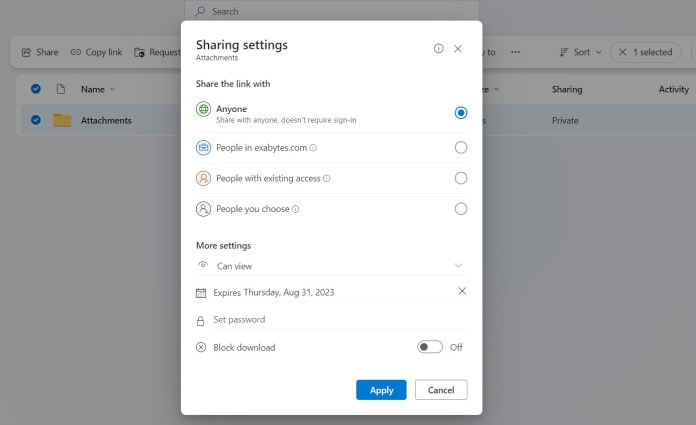
set link expiration when sharing link using OneDrive

  1. Choose who can access the link.
  2. Set a specific duration for how long the link will remain active.

This feature is especially helpful when you’re sharing confidential data and only want the link to work for a certain timeframe.

You can adjust the access and expiration settings by accessing the “Share Link” options, as indicated below.

Once the specified time is up, the recipient won’t be able to access the shared file or folder anymore.


4. Access OneDrive files without using local storage

Offline access and On-Demand files are both valuable features in OneDrive, but it’s essential to grasp the differences between them before choosing the right one for your needs.

Offline Access files are downloaded and synchronized to your computer. This allows you to access them even when you’re not connected to the internet.

On-Demand files, on the other hand, reside solely in the cloud and aren’t downloaded to your computer. Yet, you can conveniently access them through File Explorer on your computer while online. This eliminates the need to switch between applications and saves you time.


5. Personal Vault for added security 

If you have sensitive information stored in your OneDrive account, you can enhance security by utilizing the “Personal Vault” feature.

This feature adds an extra layer of protection by encrypting your files and demanding extra authentication before granting access.


In Closing

Remember that Microsoft OneDrive offers more than just storage—it’s like your ticket to digital freedom.

Moreover, the Microsoft OneDrive app and desktop sync work seamlessly, allowing you to access your files from anywhere. This makes protecting your data and collaborating easy and effective. 

It does not matter if you’re a student, a professional, or simply someone who enjoys technology; you can take full advantage of what OneDrive has to offer.  

Get Started with Microsoft 365 Plans for Your Business

Ready to take your business to the next level? Look no further than our Microsoft 365 Plans for Business!

Seamlessly combining productivity, collaboration, and security, these plans are tailored to meet the unique needs of your growing enterprise.

Related articles:

Comparing Dropbox vs iCloud vs Google Drive vs OneDrive

(Office MS Excel) Master Your Finances with Microsoft Excel

Top Web Hosting Control Panels: Features & Comparisons

0

web hosting control panel

A web hosting control panel is like a dashboard for your website.

You can manage your domain names or website addresses, set up emails, upload your site’s files, and perform important settings related to your website.

It’s the central control of your web hosting and websites.

In this article, we are pleased to discuss the most popular control panels, including the popular ones, such as cPanel control panel and Plesk control panel.

Read on to learn more. 


Plesk Control Panel

Plesk control panel

Plesk is a user-friendly control panel for VPS hosting.

It gives you a clear and easy way to handle your website, domains, emails, and databases all in one place.

This helps you work more efficiently.

Plesk is known for being both simple to use and packed with useful features.

Some of the standout features of Plesk that help you manage your hosting better include:

  • Automated Tasks: You can schedule tasks to run at specific times, like running a command or script. This makes managing your server tasks easier.
  • Restricted Access: You can control who can access your control panel and limit what they can do. This helps keep unauthorized people from making changes to your server.
  • Advanced Monitoring: You can keep an eye on how much of your server’s resources each domain is using. This helps you spot any performance issues.
  • Repair Kit: If something’s not working right on your server, Plesk can help diagnose and even fix the issue automatically.
  • SSL Management: You can buy and set up SSL certificates directly from Plesk. These certificates help secure your website.

Plesk control panel works with different operating systems, like Windows Server and various Linux versions. 

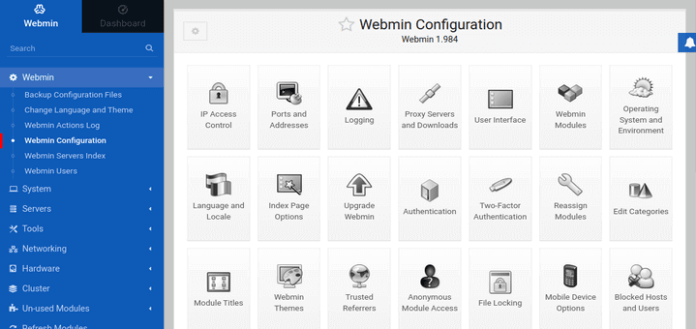
Webmin Control Panel

Webmin control panel

This web control panel is available for a wide range of Unix systems, including BSD, Linux, and Solaris.

It’s also partly available for Windows, meaning you can install it on Windows, but not all features will be visible.

Webmin’s design might not be the simplest or most user-friendly, but it’s highly adaptable.

For example, it includes an Apache web server for configuring Apache settings and features.

Additionally, the developers made different panels based on cPanel for various purposes and types of hosting:

  • Usermin: A web interface for managing emails, setting up mail filters, passwords, and more.
  • Cloudmin: An interface for managing virtual servers.
  • Virtualmin: Used to manage multiple virtual hosts, similar to Plesk.

While Webmin might not be as user-friendly as some other panels mentioned in this article, it’s free and can be installed on a variety of operating systems. 

ispmanager Control Panel

ISP Manager

ispmanager is a control panel designed for Linux systems, and it’s widely popular among hosting companies in Eastern Europe.

Despite its simple and basic appearance, it’s a viable option.

There are four versions of this web panel: Lite, Pro, Host, and Business.

The Lite version, in addition to the common features found in most panels, can be used for:

  • Managing web servers
  • Creating users with different levels of access
  • Importing data from remote servers

Because of this, the Lite Panel is commonly used for dedicated servers and VPS solutions.

On the other hand, the Business version is more suitable for shared or reseller hosting.

It allows for managing multiple servers (clusters) and makes it easy to create and manage user accounts.

cPanel Control Panel

cpanel dashboard

cPanel is the most widely used control panel. It’s a user-friendly dashboard accessible through a web browser, designed mainly for managing your web hosting on Linux systems.

You can apply it to different types of hosting, whether it’s shared, dedicated, or managed WordPress hosting.

But, if you’re setting up cPanel on a VPS or dedicated server, it can be quite tough to remove and switch to another choice.

With cPanel web hosting, you can do tasks easily without needing complex commands.

It has a graphical interface that’s easy to understand and a server management interface called WHM (Web Host Manager).

When these interfaces team up, managing websites becomes simple.

Inside cPanel, tools and apps are grouped under categories like files, databases, and software, which helps you navigate smoothly.

Each group has icons representing tools, applications, features, or functions for tasks related to website management, server control, and other hosting jobs.

Icons serve as clickable shortcuts that lead you to various functions and settings within cPanel.

You can even rearrange these icons using drag-and-drop, making it possible to customize your dashboard and make your work more efficient.

cPanel brings you features like:

  • Automatic management of all server tasks
  • Creating emails and calendars
  • Adding extra tools and plugins
  • Tools for creating custom databases.
  • Safe backups and file management
  • Enhancing your system’s security at different levels

hPanel Control Panel

hPanel for WordPress

hPanel is a special control panel made by Hostinger, designed just for Hostinger users.

It’s already set up for the users of all hosting services.

Think of hPanel as a dashboard for your website.

It looks a bit like cPanel, but it’s easier to use, especially if you’re new to web hosting.

It’s available in different languages too, like English, Portuguese, Spanish, and French.

On the hosting screen, you’ll find a score for how well your site is doing, quick links, warnings about dangerous threats, and tips to make things better.

There’s a File Manager too, so you can change your site’s files without any technical skills.

The rest of the tools are on the side. You can do lots of things with hPanel:

  • Databases: Make a special database for your site and control it.
  • Email: Set up new email accounts and make automatic replies.
  • Backup: Keep your site safe by making copies you can bring back.
  • CDN: Speed up your site with Hostinger’s special tool (not for all users).

And if you’re good with websites, hPanel has extra tools for you.

You can make tasks happen on their own with “cron jobs.” 

Control Web Panel (CWP)

Control Webpanel

CWP, previously known as CentOS Web Panel, is software used to manage servers on Linux systems.

It’s considered one of the top alternatives to cPanel for people who run their own cloud servers.

CWP comes in both paid and free versions.

The free version shows all the features of the pro version, but with a notification that those features are locked.

Setting up the free version is very straightforward.

Some of its features include:

  • A modern and easy-to-use interface.
  • Management of SQL databases.
  • Improved security measures.
  • Handling of DNS records.
  • Visualizing server logs.
  • Tools for monitoring server performance.

Virtualmin Control Panel

Virtualmin control panel

Virtualmin is a free and open-source control panel for web hosting.

It works on Linux and BSD systems.

With over 150,000 installations worldwide, it’s the most popular and comprehensive open-source control panel available.

The Virtualmin tool for managing web servers is both powerful and adaptable.

There’s no equivalent when it comes to the combination of features and flexibility.

Built on top of Webmin, a web-based system administration tool, Virtualmin is developed by the same team.

It’s fully integrated with user management, monitoring capabilities, software management, access control lists (ACLs), and security features.

It’s particularly useful for hosting providers, web developers, web designers, and regular users.

Here are some of its key features: 

  • Advanced access control.
  • Easy visualization of server logs.
  • Monitoring tools.
  • A range of security features.
  • Comprehensive tools for database management.

Ajenti Control Panel

Ajenti Server Panel

Agenti is a lightweight control panel designed for Linux systems.

It helps you manage several tasks, such as handling multiple websites, setting up firewalls, creating email accounts, managing FTP access, and tracking activity logs.

The control panel boasts a user-friendly interface that simplifies the hosting and website creation processes.

Highlighted features of Agenti include:

  • A responsive remote terminal that lets you manage your server.
  • Access from anywhere, making it convenient.
  • Quick and secure access to your server.
  • The ability to easily expand its functionality using the Python programming language.
  • A variety of available plugins to add extra features.

All in All

We hope our lineup of most popular web hosting control panels, including cPanel and Plesk, can provide you with valuable tips for smoother website management.

Remember, there is no such thing as the best web hosting control panel; the perfect fit always depends on your unique needs and requirements.    

Unlock seamless control with our cPanel and Plesk control panels!

Experience effortless website management and optimization.

Get started today and take full command of your hosting environment.

cPanel – Linux Web Hosting Control Panel

Related articles:

Difference between Linux and Windows Web Hosting

NVMe Web Hosting: How Does NVMe Apply To Hosting?

How Search Engine Work? From Indexing, Crawling to Ranking

0

how do search engine work

If you’ve ever wondered how search engines work and what makes your website appear in search results, the answers are crawling, indexing, and ranking.

For your content to shine on the Search Engine Results Page (SERP), search engines need to find it first. 

Imagine search engines as digital explorers tirelessly crawling the web, discovering and cataloging web pages; this process is called crawling.

Once found, these pages are organized into massive libraries known as indexes.

But just being in the index isn’t enough; ranking is the final showdown.

Before getting started, let’s find out what search engines are and how they work. 


What is a Search Engine?

list of search engines in the world

Search engines enable users to explore the internet’s content by entering keywords. While a handful of search engines dominate the market, several others are available to users. When a query is inputted, the search engine produces a Search Engine Results Page (SERP), arranging discovered pages based on their relevance. The methods employed for this ranking can vary among different search engines.

Search engines frequently update their algorithms, the programs responsible for ranking results, with the goal of enhancing user satisfaction. Their objective is to grasp how users conduct searches and provide them with the most fitting response to their query. This involves prioritizing pages of the highest quality and relevance.

Related: Explore the Google Search Status Dashboard to stay updated on algorithm changes.

Here are some of the best search engines:

  1. Google
  2. Bing
  3. Yahoo
  4. Baidu
  5. Yandex
  6. DuckDuckGo
  7. AOL Search
  8. Ask.com
  9. Ecosia
  10. Startpage


How Do Search Engines Work?

Search engines operate using three main functions: Crawling, Indexing, and Ranking.

Process 1: Crawling

Crawling is the initial process during which search engines deploy a group of robots, commonly known as crawlers or spiders, to locate fresh and updated content on the web. This content can take various forms, such as webpages, images, videos, PDFs, and more. The method of discovery hinges on links.

In the case of Google, Googlebot initiates the process by fetching a handful of web pages. It then proceeds to follow the links present on those pages in order to uncover new URLs. By traversing this path of interconnected links, the crawler identifies new content and integrates it into their index, referred to as Caffeine.

This index acts as an extensive database of discovered URLs, which can later be accessed when a user is searching for information that aligns well with the content found at a particular URL.

Process 2: Indexing

Indexing involves taking the organized information gathered from the crawled pages and incorporating it into the search index.

This search index is essentially what you explore when you use a search engine.

This emphasizes the significance of being indexed in prominent search engines like Google and Bing.

If you’re not in the index, users won’t be able to locate you. Your presence in the index is what makes you discoverable to users.

Process 3: Ranking

Search results receive their rankings through a variety of considerations. These factors include aspects like keyword density, speed, and links. The core objective of the search engine is to furnish the user with the outcome that is most relevant.

While many search engines offer guidance on enhancing your page’s ranking, the precise algorithms employed are closely protected and undergo frequent modifications to prevent misuse. Nonetheless, adhering to best practices in search engine optimization (SEO) can assure you that:

  • Search engines can easily crawl your website. You can also prompt them to crawl for new content.
  • Your content is indexed for the right keywords, so it can appear in relevant searches.
  • Your content can rank highly on the SERP. 


Other Factors that Affect How Search Engines Work

1. Learning from User Behaviour 

mobile-user

Search engines closely monitor user interactions with search results. They observe whether users click on the first link or explore further down to the fifth link. Additionally, they track the duration users spend on a particular page.

This user feedback holds immense value. It serves as a crucial resource for search engines to fine-tune their algorithms, resulting in continual enhancements to the quality of search results over time.

2. Your Search History Matters 

Have you ever noticed that your search results seem to be personalized just for you? Well, that’s thanks to your search history in action. If you’ve activated this feature, your search history plays a role in fine-tuning the relevance of your upcoming search results.

However, it’s important to note that this explanation provides a simplified overview. The actual process is much more intricate and precise.

3. Specialized search engines: directory search engines

Some specific search engines work like directories designed for certain types of content. These platforms show results only for content that’s been carefully selected and added, without relying on internet crawling. Despite this difference, you can still use SEO strategies successfully to achieve a high ranking for relevant searches within these directory-style search engines.

4. Rich media search results

Universal or ‘blended’ search refers to how search engines display a variety of content types in their search results to users. In addition to the traditional text-based page results, the Search Engine Results Page (SERP) will also incorporate diverse media content, including images, videos, maps, articles, and shopping pages.

The composition of various content types on your website, like an instructional video demonstrating product usage or a blog, can influence your visibility on search result pages and the level of your ranking. Employing ‘structured data’ on your website aids search engines in comprehending and showcasing specific types of content.

This involves incorporating code into the HTML markup. The utilization of structured data allows information like review ratings, images, addresses, and phone numbers to be presented on the search engine results page.


In Summary

As we examine how search engines function, the importance of their processes becomes very clear.

The intricate workings between crawling, indexing, and ranking determine the arrangement of search results.

However, there’s more to the story.

Nowadays, local results aren’t just influenced by online activities; they’re also shaped by real-world interactions.

In this regard, Google is considering real-time engagement metrics, a logical step in providing the best local options. 

Elevate your online visibility with our powerful SEO services, designed to propel your business to the top of search results.

Experience unmatched growth today!

Get Free SEO Review Report

Related articles:

Healthcare SEO: How Dental Clinic Gain 27x Organic Traffic

Skyrocket Waterco Malaysia B2B Website Clicks by 50% with SEO Strategies

Event & Activities

Event & Activities