On Tuesday, May 30th, 2023, Exabytes organized a digital exporting workshop in Setiawalk, Puchong with the aim of empowering Malaysian exporters and entrepreneurs to capitalize on global eCommerce platforms and AI tools for business growth.
The program centered around the latest trends in the global export market, emphasizing top platforms like Alibaba.com and AI tools such as ChatGPT.
Exporting in the Age of AI in Puchong
The workshop commenced with a warm-up session conducted by Keith Leong, Exabytes’ Business Development Manager. Following that, Martin Tang, the Digital Marketing Manager at Exabytes, took the stage to deliver his talk titled “Exporting with AI and Unleash the Power of Global eCommerce.”
Martin shared valuable insights on the potential of AI-driven digital marketing to give exporters a competitive advantage with its strong market analysis and tips on how to make your export more efficient.
He introduced the audience to ChatGPT, an AI-powered language model that can assist with competitive analysis, brand monitoring, and more.
After Martin’s presentation, a Q&A session allowed attendees to seek clarification and deepen their understanding of the topics covered.
The next speaker, Cheong Peng, Vice President of Digital Sales at Exabytes, addressed the audience on “Mastering Global eCommerce: From Clicks to Conversions.” Cheong provided valuable insights based on AI tool recommendations for export best practices.
She highlighted the essential features of a global eCommerce platform and shared strategies for building a successful export business using the platform.
The workshop progressed into an interactive Q&A session led by Keith, where he addressed various questions posed by business owners and managers, providing them with practical advice and insights.
The event concluded with networking opportunities, allowing attendees to connect, exchange ideas, and establish fruitful professional relationships.
During the workshop, we were fortunate to have many brands and companies who’ve interacted with us and provided valuable insights into their specific industries.
With that, we are grateful for each attendee for allowing us to progress further on our objective to educate and empower Malaysian exporters and enable them to leverage the power of global eCommerce platforms and digital marketing for business growth.
Conclusion of the Exporting Workshop in Puchong
With Malaysia’s exports behind the key driving force for the economy in the foreseeable future, the demand and support for such programs has never been greater.
We take pride in bringing this workshop to our esteemed clients in Puchong and the central region of the country.
Overall, the workshop was a success, enabling Exabytes to engage and equip attendees with valuable insights into the latest trends in the global export market and best practices for building a thriving export business.
The emphasis on Alibaba.com and AI tools like ChatGPT was particularly beneficial, as these technologies are increasingly pivotal in the realm of global eCommerce.
The networking opportunities provided attendees with a platform to connect with industry peers, fostering collaboration and idea-sharing that may lead to future growth and success.
Look out for more Exporting Workshop as we engage more speakers and go on tours around the nation.
Unlocking a future free from the shackles of traditional passwords, Google spearheads a remarkable transformation in the way we authenticate ourselves online.
Introducing passkeys, a groundbreaking concept that holds the potential to revolutionize our digital landscape.
Imagine a world where the hassle of remembering complex passwords is replaced by a more advanced and convenient solution. In collaboration with tech giants like Apple, Facebook, and Microsoft, Google is leading the charge towards a passwordless future.
What is a Passkey?
Passkeys are a new method for logging in to websites and applications. They offer simplicity and enhanced security compared to traditional passwords, eliminating the need for weak and easily guessable combinations like “password123.”
Passkeys allow users to sign in using fingerprint, facial scan, or screen lock PIN, and they provide better protection against online attacks such as phishing, making them more secure than SMS one-time codes.
The Implications of Password-Free Security for Privacy
Imagine a scenario where your favourite website supports passwords, but you want to eliminate passwords and wonder if using a passkey instead will truly enhance the security of your account. The answer is a resounding yes, for several reasons:
Passwords, due to their inherent complexity, are susceptible to being guessed. Weak and predictable passwords are often compromised, whereas the number of possible passkey combinations is practically infinite.
Passwords are vulnerable to interception, phishing, and social engineering attacks. They can be viewed in transit or manipulated to deceive users into revealing them. In contrast, passkeys never leave your device and cannot be shared.
Passkeys vs. Passwords
Traditional passwords are considered shared secrets. Although they appear as asterisks or bullets on the screen, they must be entered and transmitted as plain text.
When creating an online account, the website encrypts or scrambles the password using a predetermined mathematical algorithm, resulting in a hash that is stored by the website or application.
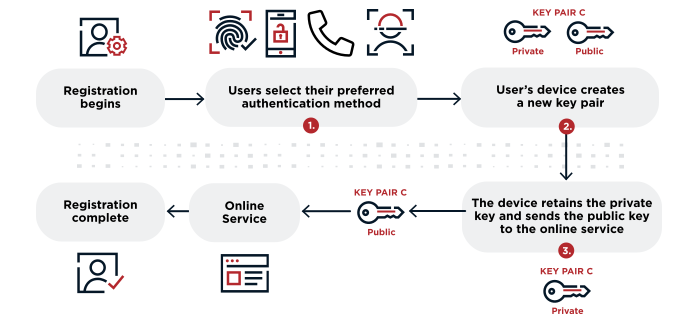
With passkeys, on the other hand, password-free authentication is achieved through public key cryptography. Each passkey consists of a mathematically related pair of keys: a public key and a private key.
The public key is stored by the app or website upon account creation because it is intended to be shared. However, the private key remains on the device and is never revealed.
Google
Google, a pioneer in the technology industry, has been at the forefront of driving a paradigm shift towards a password-free future by revolutionizing the use of passkeys.
Recognizing the limitations and vulnerabilities of traditional passwords, Google has made significant advancements in developing and implementing innovative authentication methods to enhance security and user experience.
One of Google’s notable advancements is the introduction of the Titan Security Key, a physical device that serves as a passkey for authentication.
The Titan Security Key utilizes strong cryptography to provide a secure and convenient way for users to log in to their Google accounts.
By plugging in the Titan Security Key or connecting it via Bluetooth, users can verify their identities and gain access to their accounts without the need for passwords.
FIDO standards allow users to authenticate their identities using biometric factors, such as fingerprint or facial recognition, or secure tokens like the Titan Security Key.
By embracing FIDO standards, Google is driving the industry towards a future where passwords become obsolete, and users can rely on more secure and user-friendly authentication methods.
Additionally, Google’s advancements in machine learning and artificial intelligence have played a crucial role in password-free security.
With the ability to analyze user behavior patterns and device characteristics, Google’s systems can accurately identify and authenticate users without the need for passwords.
This intelligent authentication approach not only enhances security but also provides a seamless and frictionless user experience.
Apple, too, has made remarkable strides in advancing the use of passkeys, contributing to the paradigm shift towards a password-free future.
With a focus on user privacy and security, Apple has introduced innovative authentication methods that offer enhanced convenience and robust protection.
One of Apple’s notable advancements is the implementation of Face ID and Touch ID, biometric authentication technologies that serve as passkey.
Face ID uses facial recognition, while Touch ID relies on fingerprint scanning, enabling users to seamlessly and securely unlock their devices and authenticate their identities without the need for passwords.
Furthermore, Apple has been at the forefront of promoting passwordless authentication through industry collaborations.
By actively supporting the Web Authentication (WebAuthn) standard, Apple has contributed to the development of open and interoperable solutions that enable users to authenticate their identities across various websites and applications using secure and convenient methods like biometrics or hardware security keys.
Apple’s commitment to password-free security is reflected in its continuous advancements in device security and encryption.
By incorporating strong hardware and software protections, Apple devices offer a secure environment for passkey-based authentication, safeguarding user data and privacy.
In the ever-evolving landscape of digital security, Facebook has embraced a paradigm shift towards a password-free future.
Recognizing the limitations and vulnerabilities associated with traditional passwords, the social media giant has been actively exploring innovative alternatives, with a particular focus on the use of passkeys.
Passkeys, also known as cryptographic keys, present a more secure and convenient method for authentication. Unlike passwords, which are prone to being guessed, stolen, or forgotten, passkeys are unique cryptographic identifiers generated for each user.
Facebook’s approach involves leveraging hardware security keys, biometric authentication, and other advanced technologies to enable seamless and robust user verification.
FIDO2 enables the use of passwordless authentication methods, such as USB or NFC-based security keys and biometrics like fingerprint or facial recognition.
By adopting FIDO2 standards, Facebook empowers users to rely on a combination of unique physical devices and biometric data, making it significantly more difficult for unauthorized individuals to gain access to accounts.
Moreover, Facebook has been proactive in collaborating with industry leaders and standards organizations to promote the widespread adoption of passwordless authentication.
By championing initiatives like the FIDO Alliance, Facebook aims to establish a robust ecosystem where passkeys become the norm, driving the industry towards a password-free future.
Microsoft
Microsoft, a technology powerhouse, recognizes the inherent weaknesses of traditional passwords. The company has been actively developing innovative authentication methods to enhance security and user experience.
One of the notable advancements by Microsoft is the introduction of Windows Hello, a biometric authentication system. Windows Hello enables users to log in to their devices using facial recognition, fingerprints, or iris scans, eliminating the need for passwords.
By leveraging unique biometric traits, Windows Hello provides a more secure and convenient authentication experience.
Additionally, Microsoft has been championing the use of FIDO2 (Fast Identity Online) standards, which promote passwordless authentication. FIDO2 enables the use of hardware security keys or biometrics to verify user identity.
Microsoft has integrated FIDO2 support into its platforms, allowing users to leverage external security keys or built-in biometric sensors for secure authentication across various Microsoft services and applications.
Moreover, Microsoft has actively collaborated with industry partners and standards organizations to drive the adoption of passwordless authentication.
By promoting initiatives like the FIDO Alliance and contributing to open standards, Microsoft aims to create a password-free ecosystem that prioritizes stronger security measures while ensuring a seamless user experience.
Passkeys represent a significant leap towards a future where the frustration of managing passwords becomes a thing of the past.
Google, Apple, Facebook, and Microsoft are leading the charge in this transformative journey towards a password-free era.
By embracing passkeys, we can bid farewell to the complexities of traditional passwords and welcome a simpler, yet more secure way of accessing our digital lives.
With these tech giants paving the way, we can expect a more seamless and convenient online experience that prioritizes both usability and security. So get ready to embrace passkeys and unlock a future without the hassle of passwords.
In the age of smartphones and constant connectivity, mobile fraud has become a prevalent threat, and a recent scam report highlights the alarming consequences.
Imagine receiving a scam call that not only tricks you but also drives you into a nightmarish situation involving a staggering S$300,000.
This chilling incident sheds light on the dark world of phone scams and the financial fraud orchestrated by scammers operating from Malaysia.
In this article, we will delve into the details of this harrowing scam call, explore the tactics employed by these fraudsters, and discuss the importance of staying vigilant to protect ourselves from falling victim to such scams.
A Call That Turned into a Tragedy
In this economy, the fear of losing a significant portion of one’s hard-earned money is a nightmare shared by almost everyone.
Sadly, this nightmare became a reality for Lee, a 39-year-old man who fell victim to an anonymous call scam just two days ago, losing RM1 million (US$222,880) in a 14-second online banking incident.
The tragedy unfolded when the caller claimed to be from PosLaju and requested Lee’s one-time password (OTP). However, Lee grew suspicious when asked for his bank account’s OTP and suspected foul play.
Despite terminating the call, he discovered that RM1 million had been swiftly withdrawn from his account.
Lee promptly reported the incident to the bank and filed a police report. Seeking assistance, he approached Sarawak Democratic Action Party (DAP) for help.
According to Michael Kong, the special assistant to Sarawak DAP chairman Chong Chieng Jen, the money was transferred to an account named “Celcom Sdn Bhd” based on Lee’s online bank transfer records.
Expressing concern over the escalating online banking fraud cases, Kong called on the federal government to address the issue urgently.
He questioned how such large withdrawals could occur within minutes without proper security measures in place, highlighting the need for banks to be accountable for the losses incurred by these scams.
While the DAP has reached out to the bank involved, Kong expressed dissatisfaction with the standard response of waiting 14 days, emphasizing the urgency for the bank to explain the circumstances behind such a significant transaction.
He stressed the importance of banks reinforcing their security measures to prevent further instances of online fraud and restore public confidence in their ability to safeguard savings.
Ultimately, the government must take swift action to combat bank fraud and ensure that banks are held responsible for the losses suffered by victims. With the security of financial institutions being compromised, it raises concerns about the safety of savings for ordinary individuals.
How to Report a Scam Call in Malaysia?
The NSRC (National Scam Response Centre) is a powerful collaborative effort between the National Anti-Financial Crime Centre (NFCC), the police, Bank Negara Malaysia (BNM), the Malaysian Communications and Multimedia Commission (MCMC), financial institutions, and the telecommunications industry.
By pooling their resources and expertise, these institutions unite to swiftly and effectively combat various financial schemes.
Types of Fraud Investigated by the NSRC
The NSRC primarily focuses on online financial schemes. This includes instances where victims discover unauthorized transactions in their bank accounts or are tricked into transferring funds through online financial services.
Phishing scams, Macau scams, malware attacks, package delivery scams, and romance hoaxes all fall within the scope of the NSRC’s investigation.
Assistance Provided to Victims by the NSRC
Upon receiving a report, the NSRC coordinates a rapid response involving law enforcement agencies, financial institutions, and telecommunications companies.
Their aims are to prevent further financial losses for the victims, trace stolen funds, investigate the crime, and pursue legal action against the perpetrators.
What to Do If You’ve Been Defrauded
If you have fallen victim to a scam, take immediate action to minimize further financial loss:
1. Contact Your Bank or Call 997
Reach out to your bank’s 24/7 hotline or the NSRC’s 997 hotline (available from 8 a.m. to 8 p.m., including public holidays) as soon as you discover unauthorized or unintended bank transactions.
This prompt action can help intercept stolen funds and potentially save you thousands. While there is no guarantee of a refund, swift reporting is crucial.
2. File a Police Report
Alongside notifying your bank or the NSRC’s hotline, promptly file a police report at the nearest police station. This step is necessary to initiate a formal investigation. Prioritize contacting your bank or the NSRC’s hotline first to save time.
3. Inform your Creditor Regardless of the Timeframe
Even if the incident occurred more than 24 hours ago, contact your bank. The NSRC’s 997 hotline is primarily for emergency response, so a prompt reaction may not be possible in such cases.
Nevertheless, it is crucial to disclose the scam to your bank so that appropriate actions can be taken by the authorities.
How to Report a Scam Call in Singapore?
Scam calls are an unfortunate reality in today’s digital age, and it is crucial to take immediate action to protect yourself and others from falling victim to these fraudulent activities.
If you receive a scam call in Singapore, here are the steps you should follow to report it:
1. Hang Up and Do Not Share Personal Information
The first and most important step is to end the call immediately. Do not engage with the scammer or provide any personal or financial information. Remember, legitimate organizations will never ask for sensitive information over the phone.
2. Take Note of Caller Details
Make a mental note of the caller’s phone number or the displayed caller ID. This information will be useful when reporting the scam call to the relevant authorities.
3. Report to the Police
Contact the Singapore Police Force by dialing the non-emergency hotline at 1800-255-0000. Inform them about the scam call, providing all relevant details such as the caller’s phone number and a brief description of the incident. The police will document the report and investigate the matter accordingly.
4. File a Report with Scam Alert Websites
Singapore has dedicated websites and platforms where you can report scam calls and help raise awareness about the ongoing scams in the country. The websites include:
>> ScamAlert.sg <<
Visit the official website of Scam Alert Singapore (www.scamalert.sg) and submit a report. Provide accurate information about the scam call, including the caller’s phone number, time of the call, and a description of the scam.
5. Anti-Scam Helpline
You can also call the Anti-Scam Helpline at 1800-722-6688 to report the scam call and seek further advice from the authorities.
6. Inform Your Phone Service Provider
Contact your phone service provider and notify them about the scam call. They may have their own mechanisms in place to track and investigate fraudulent activities on their networks.
Sharing the caller’s phone number with your service provider can assist in their efforts to identify and block scam calls.
7. Educate Others and Share Information
Help protect your family, friends, and the wider community by sharing information about the scam call you received.
Spread awareness through social media, word of mouth, or community forums to prevent others from falling victim to the same scam.
Alert !! Information Needed to File a Fraud Report
When reporting a scam call, gather the following information:
A concise description of the incident, including a timeline of events.
Your personal information: name, contact details, identification number, and bank account number.
Scammer’s information: name and contact details.
Transaction specifics: bank account number(s), transfer balance, and transfer time.
Additionally, be prepared to provide evidence such as transcripts of conversations with the con artists to support your case.
In a Nutshell
The S$300,000 scam call serves as a stark reminder of the risks posed by phone scams and the devastating financial fraud they can lead to.
This real-life incident underscores the importance of being aware and cautious when it comes to unexpected calls and requests for personal or financial information.
Phone scams continue to be a significant threat, with scammers operating from various locations, including Malaysia. It is crucial for individuals to stay informed, exercise skepticism, and take necessary precautions to safeguard themselves against falling victim to these deceptive tactics.
By staying vigilant, we can minimize the impact of mobile fraud and protect our hard-earned money from these scammers.
If you’ve ever been frustrated by the error message “DNS server not responding,” don’t worry! This article will provide you with easy troubleshooting tips to quickly fix the issue.
DNS, which stands for Domain Name System, acts as a phonebook for the internet, translating domain names (like google.com) into IP addresses that computers can understand.
When your DNS server isn’t working, it can disrupt your internet connection and make accessing websites a challenge. We’ll guide you through steps to check if your DNS server address is correct and offer solutions when your DNS server appears to be unavailable.
Understanding the Function of a DNS Server
A DNS server plays a crucial role in the internet connection process by converting domain names into IP addresses. When your computer connects to a website, it uses the IP address instead of the domain name.
By translating the website’s name and address into an IP address, a DNS server ensures that users can connect to the correct websites and receive the intended services.
How DNS Servers Work
Having an understanding of how DNS servers function can help in troubleshooting DNS issues. A website has both a name and an IP address. The name is what users enter into a browser, such as https://www.exabytes.my, to access a website.
This domain name is associated with a numerical IP address that represents the website’s location on the internet. It is the responsibility of a DNS server to link a name to a number.
When a website’s name is entered, the browser requests its IP address from the nearest DNS server. The DNS server responds with the IP address, and the browser establishes a connection with the website, which is then displayed on the screen. Users are usually unaware of the tasks performed behind the scenes to make this system work.
When you come across the message “DNS server unavailable,” it means that although your computer is connected to the internet, it is unable to convert the received data into webpage content.
This indicates a lack of a functional internet connection on your PC because it fails to display any information when visiting a website. A DNS problem can have various causes and may require different solutions, as it is typically not a single underlying issue.
Troubleshooting Tips for Correcting DNS Errors
Resolving a DNS error can involve various potential solutions, ranging from minor adjustments to complete infrastructure changes, depending on the root cause of the issue. The following sections provide different methods for troubleshooting and resolving DNS errors.
Identifying the Source of the Issue
Determining the root cause is an essential step in finding a solution for DNS issues. The problem can originate from the browser, computer, router, or internet service provider (ISP). Identifying the source will guide your troubleshooting approach.
Source of the Issue
Troubleshooting Steps
Solutions
Browser
Access the page using a different browser
Clear the browser’s cache and data
Computer
Check DNS settings and verify accuracy
Disable firewall and antivirus software
Turn off secondary connections
Update network adapter drivers
Router
Connect via Ethernet cable
Reboot the router
Check router’s configuration<br>Update the router
Restore factory settings
ISP
Ping DNS server IP addresses
Confirm with ISP
Remove unresponsive IP addresses
Switch to a different DNS server
Contact ISP for assistance
1. Browser
To determine if the browser is causing the issue, try accessing the same page using a different browser. If it works, the problem lies with your initial browser. Ask others connected to the same router if they experience connection issues.
If they don’t, the computer itself may be the cause, requiring a local solution. If multiple users face the same DNS problem, the issue likely resides with the router.
Solution: Clearing the browser’s cache and deleting its data is a common solution for browser-related DNS issues. Clearing the cache ensures you have the most up-to-date information and often resolves connection problems. If clearing the cache doesn’t fix the DNS issue, further examination of the computer is necessary.
2. Computer
When a computer or router is set up, its DNS settings are configured to connect to the appropriate DNS server. When DNS problems arise, it’s advisable to check the device’s settings for any alterations.
Check DNS Settings: Consult the network administrator or ISP for accurate DNS settings and verify them on the computer. If using services like OpenDNS, ensure compatibility with your network or ISP.
Disable Firewall and Antivirus Software: Temporarily disabling firewalls and antivirus programs can help identify if they are blocking IP addresses or websites. If disabling them allows successful internet connection, review the DNS configurations within the firewall and antivirus software.
Turn off Secondary Connections: Disable other active connections like Bluetooth to prevent potential conflicts. On Windows systems, disable peer-to-peer networking.
Update Network Adapter Drivers: Ensure network adapters have the latest drivers. If not, update the drivers and attempt the connection again.
3. Routers
Routers can obstruct connectivity to DNS servers due to incorrect configurations or the need for replacement. Here are some troubleshooting techniques for routers.
Connect via Ethernet Cable: Use a wired connection by connecting a computer to the router with an Ethernet cable. If the issue is resolved using Ethernet, the router may be the problem. Verify the router’s configuration.
Reboot the Router: Resetting the router can resolve DNS issues by refreshing its cache. Unplug the modem and router, wait for at least 15 seconds, and reconnect the power cables. Wait until the devices are online.
Update the Router: Check for available updates for the router and consider applying them if applicable.
Restore Factory Settings: Resetting the router to factory settings removes any custom DNS configurations that might cause issues, especially in residential routers.
If the routers are functioning correctly, the issue likely lies with the ISP.
4. ISP (Internet Service Provider)
ISPs maintain DNS servers, and changes made by the provider may require adjustments that can lead to internet connection failures.
Is it the ISP? The DNS server of the ISP may be down. Confirm this by pinging the IP addresses of the DNS servers and remove any unresponsive addresses. Select “Obtain DNS server automatically” to obtain the IP addresses, or contact the ISP for assistance if the option is unavailable.
Is it a DNS server issue? DNS servers can become unavailable due to overload or malfunctions. Switching to a different DNS server using a provided list of DNS server addresses may resolve the problem.
Is it the Organization’s Server? If a user connects to a VPN or local work network, they may receive a DNS address from their company’s server, independent of the ISP. If DNS errors occur in this scenario, investigation of the server may be necessary.
In Conclusion
You can effectively resolve the problem of a DNS server not responding by following appropriate troubleshooting techniques. Keep in mind that the DNS server acts as a translator, converting domain names into IP addresses to establish connections with websites.
If you come across the error message “DNS server not responding,” it indicates a potential impact on your internet connection. However, there’s no need to panic. By verifying your DNS server address and implementing solutions for addressing unavailability issues, you can swiftly resolve the problem and resume seamless web browsing.
Gmail, provided by Google, is a widely used email service.
However, it’s important to note that there are different versions of Gmail available.
This article aims to explore the main distinctions between personal Gmail and Gmail for business, known as Google Workspace.
Let’s dive into the exciting variations between these two Gmail versions!
Personal Gmail is the free email account commonly used for everyday communication.
On the other hand, Gmail for Business is specifically designed for professionals and organisations, offering additional features and functionalities tailored to meet business needs.
It is also a great option for student email accounts.
The Key Differences Between Personal Gmail and Google Workspace? Let’s Explore!
1. Resource Ownership
Google Workspace allows centralised management, while personal Gmail accounts are privately owned.
Google Workspace provides employers with the highest level of control over employee accounts.
Personal Gmail accounts are owned by individual users, and employers have no access to them or their contents.
When an employee leaves the company, they take their files and data from their personal mail account, including other Google services.
Gmail for Business enables administrators to transfer files and data to a new employee’s corporate Gmail account using the integrated data migration utility while maintaining confidentiality.
2. Design and Purpose
Gmail is designed for personal use, while Google Workspace is specifically designed for business use.
Google Workspace includes business Gmail and team collaboration tools.
It is recommended to use a business email address matching your company’s name with Google Workspace.
Google Workspace allows the use of company domain names for different subsidiaries on a single platform.
3. Team Management and Collaboration
Personal Gmail lacks team management features, while Google Workspace offers them.
File sharing in personal Gmail is restricted to individuals and requires manual entry of email addresses.
Google Workspace enables sharing files with teams in a single click, enhancing collaboration and saving time.
In Google Workspace, members of the same group can see files’ access and permissions can be easily modified via a drop-down menu in business Gmail.
4. Google Workspace Features
Google Workspace includes an admin console for centralised management, which is not available in personal Gmail.
With Google Workspace, business owners have control over their company’s data, including access restrictions.
Google Workspace provides enhanced customer service and support compared to personal Gmail.
Google Workspace Business Starter offers double the storage capacity of personal Gmail.
Google Workspace includes a diverse selection of collaboration tools, such as Google Calendar, Drive, Spreadsheets, Documents, and Sites.
Approximately fifty additional applications are included at no additional cost with Google Workspace subscriptions.
5. Subscription
Personal Gmail is free, while Gmail for business (Google Workspace) requires a paid subscription.
Explore the plans and pricing for Google Workspace to find the right solution for your business needs.
Who Should Choose Personal Gmail / Google Workspace?
When it comes to choosing between Personal Gmail and Google Workspace, the decision depends on your specific needs and requirements.
Here’s a breakdown:
1. Personal Gmail
Personal Gmail is ideal for individuals who need a basic and free email service.
It provides essential features and browser add-ons, along with 15GB of complimentary cloud storage.
If you’re an individual looking for a simple and straightforward email solution, Personal Gmail is a great choice.
2. Google Workspace for Small Businesses
For small businesses with up to 10 employees, Google Workspace’s Business Starter plan is recommended.
This plan offers enhanced support, centralised IT management, and a low monthly cost of $6 per user.
The Business Standard plan provides even greater support, additional storage, and improved performance for Google apps, making it suitable for midsize businesses.
3. Google Workspace for Large Enterprises:
Large enterprise-level enterprises can benefit from Google Workspace’s Enterprise offering.
This plan includes customised solutions, a dedicated account manager for support, advanced security measures, and more.
If your organisation has extensive needs and requires advanced features and support, the Enterprise plan is the right choice.
In a Nutshell
Understanding the differences between Personal Gmail and Google Workspace is crucial for making informed decisions regarding your email needs.
While Personal Gmail is suitable for everyday individual communication, Google Workspace offers tailored features for professionals, organisations, and even student email accounts.
Whether you’re a student or a professional, being aware of the distinctions between these two versions of Gmail will help you maximise your email experience.
In the rapidly evolving landscape of online threats and cyber dangers, a game-changing force has emerged: artificial intelligence (AI) in cybersecurity. This revolutionary technology is reshaping the way we safeguard ourselves in the digital realm.
With the advent of AI, a new era of cybersecurity has begun, bringing advanced defense mechanisms and intelligent tools.
An AI-powered security system acts as a vigilant guardian, tirelessly detecting and neutralizing threats with remarkable speed and accuracy. This article explores the transformative impact of AI on cybersecurity, ensuring a safer online experience for everyone.
Understanding Artificial Intelligence (AI)
Artificial Intelligence (AI) can be defined as the ability of computers, machinery, and other technologies to imitate human decision-making and problem-solving processes. It encompasses a range of techniques and applications that simulate human intelligence using complex algorithms, statistical models, language processing, and computational power.
AI not only processes data but also learns from it, continuously improving its performance over time. The ultimate goal of AI is to create intelligent devices or technologies that can automate human tasks, perform them at a higher level, and tackle complex challenges beyond human capabilities.
Artificial Intelligence (AI) vs. Machine Learning
While AI and machine learning are often used interchangeably, machine learning is just one aspect of artificial intelligence. Machine learning focuses on the development of adaptable and intelligent computer systems that utilize statistical models and algorithms.
Machines can learn through three main methods: supervised learning, unsupervised learning, and reinforced learning.
Examples of machine learning applications include social media friend-tagging suggestions, speech recognition software, language translation, and online customer service chatbots.
On the other hand, AI encompasses the broader concept of computers and machines simulating human intelligence in real-world settings. Machine learning is a subset of AI, specifically referring to technologies and algorithms that enable systems to recognize patterns and adapt through experience.
By leveraging the power of AI, the future of cybersecurity holds immense potential for enhanced protection and defense against cyber threats. AI-driven solutions empower organizations and individuals to stay one step ahead in the ever-changing digital landscape.
Benefits of Artificial Intelligence in Cybersecurity
Artificial Intelligence (AI) brings a multitude of advantages and applications to various fields, including cybersecurity. In the ever-changing landscape of cyber threats and the proliferation of devices, AI and machine learning offer valuable assistance in staying ahead of cybercriminals, automating threat detection, and responding effectively.
Here are some key benefits and applications of AI in cybersecurity:
1. Early Detection of New Threats
AI has the ability to detect cyber threats and potentially malicious activities that traditional software systems struggle to keep up with. Using sophisticated algorithms, AI systems can identify malware, perform pattern recognition, and detect the subtle behaviors of attacks before they infiltrate the system.
Furthermore, AI-powered predictive intelligence and natural language processing enable the automatic curation of data from various sources, providing insights into emerging anomalies, cyberattacks, and prevention strategies.
2. Vulnerability and Risk Management
By integrating AI into vulnerability and risk management programs, organizations gain a comprehensive analysis of their threat exposure and security posture. AI automates the detection, identification, and resolution of known vulnerabilities, allowing for instant data-driven decisions.
With the ability to analyze large volumes of data, AI assesses connected devices, webpages, databases, and attack surfaces to optimize vulnerability remediation and ensure adequate security measures are in place.
3. Combating Bots
The prevalence of bots on the internet poses significant risks, from account takeovers to data fraud. AI and machine learning enable the identification and differentiation between good bots, bad bots, and humans, allowing cybersecurity teams to develop a comprehensive understanding of website traffic.
AI’s data analysis capabilities empower teams to adapt their strategies to combat automated hazards effectively.
4. Breach Risk Forecasting
AI systems leverage IT asset inventory and threat exposure data to forecast areas where organizations are most likely to be compromised. This information helps allocate resources and prioritize security measures in vulnerable areas.
With prescriptive insights from AI-based analysis, organizations can enhance cyber resilience controls and processes.
5. Real-Time Threat Detection
AI-powered cybersecurity systems equipped with machine learning can swiftly detect emerging threats by recognizing patterns and deviations from the norm. Unlike traditional solutions that generate numerous false positives, AI systems eliminate false alarms, saving businesses time and resources.
The continuous learning capability of AI ensures a faster response to similar patterns and multiple threats, providing an advantage over cybercriminals.
Therefore, AI revolutionizes cybersecurity by offering early threat detection, efficient vulnerability management, protection against bots, breach risk forecasting, and real-time threat detection.
Incorporating AI into cybersecurity strategies empowers organizations to safeguard their digital assets and stay resilient in the face of evolving cyber threats.
Use Cases of Artificial Intelligence in Cyber Security
Securing computer systems and defending against cyber threats is a complex task that requires expertise in various domains such as mathematics, network analysis, and software engineering. Additionally, understanding human vulnerabilities is crucial as they are an integral part of the system.
Cybersecurity encompasses numerous specialized areas, each with its own unique challenges. What may be effective in securing one aspect, such as detecting malicious packets at the network layer, may not be as effective in strengthening a hash algorithm.
Some successful applications of artificial intelligence (AI) in cybersecurity have already been realized. One straightforward example is the use of AI to codify and apply prior knowledge.
For instance, in a case where a director at Coinbase requested assistance from ChatGPT to investigate a live Ethereum blockchain contract, the AI was able to provide a concise list of vulnerabilities and recommendations to address them.
How did AI achieve this? Although the inner workings of AI systems may be opaque, it likely leveraged insights from public discussions of similar vulnerabilities.
By aligning these past insights with the new code, the AI generated a valuable inventory of issues requiring attention, all without the need for custom programming or expert guidance.
Round Up
In conclusion, the integration of artificial intelligence (AI) into cybersecurity has brought about significant transformations. AI serves as a powerful tool in combating the ever-evolving digital threats we face.
With its ability to swiftly and accurately identify potential risks, the AI security system acts as a vigilant guard. As cyber threats become more sophisticated, AI enhances our defense mechanisms, making our digital lives safer and more secure.
With this remarkable technology at our disposal, we can navigate the online landscape with increased confidence, knowing that our digital security is being handled by capable hands.
Thinking of transferring your email mailbox to Business Gmail? In this article, we’ll show you the ropes of email migration to Business Gmail (a.k.a. Google Workspace), the professional version of Gmail designed for businesses.
By the end of this read, you’ll have a clear understanding of how to seamlessly move your mailbox to Business Gmail and leverage the powerful features offered by Google Workspace.
Let’s get started and make your email migration a breeze.
Benefits of Migrating to Business Gmail in Google Workspace
Before getting started, one might wonder what the benefits of migrating to Business Gmail in Google Workspace are. In fact, migrating to Business Gmail in Google Workspace offers a wide range of benefits for businesses.
The first and foremost advantage is the ability to have a professional email solution with a custom domain name, which significantly enhances brand identity and credibility.
Moreover, Business Gmail comes with robust security features, including advanced spam filtering and two-factor authentication, ensuring the utmost protection for sensitive data.
The seamless integration with other Google Workspace tools like Google Drive, Docs, and Calendar promotes enhanced productivity and collaboration within teams. The ample storage space and offline access to emails ensure uninterrupted operations.
Additionally, the powerful search functionality, email labeling, and organization features make email management effortless.
Getting Started: Assessing your Current Email System
When assessing your current email system, it’s important to evaluate various aspects. Begin by examining the system’s features, such as storage capacity, attachment limits, and supported protocols.
Consider the user interface, integration capabilities, scalability, and any performance issues. Assess the effectiveness of security measures, backup and recovery options, and the overall cost involved in maintaining the system.
Understanding the limitations of your current setup will provide insights into the specific benefits and improvements that migrating to Business Gmail in Google Workspace can offer.
These benefits include enhanced functionality, improved performance, robust security features, seamless integration, and cost-efficiency.
Preparing for the Migration
Before embarking on the migration process to Business Gmail in Google Workspace, it’s essential to adequately prepare for a smooth and successful transition. This subheading will guide you through the necessary steps to ensure a seamless migration experience.
1. Back up your existing mailbox
Begin by creating a comprehensive backup of your current mailbox data. This step ensures that no crucial emails or information are lost during the migration process. Consider using backup tools or exporting data to a separate storage location.
2. Inform users about the upcoming migration
Communicate with your organization’s users well in advance about the upcoming email migration. Provide them with information regarding the timeline, expected changes, and any actions they may need to take.
3. Address potential challenges and concerns
Identify potential challenges or concerns that may arise during the migration process. Develop a plan to mitigate these issues, such as providing additional support resources or conducting training sessions.
Configuring DNS Settings
Configuring DNS settings is a crucial step in migrating to Business Gmail in Google Workspace. Follow these step-by-step instructions to ensure a seamless transition:
Access your domain registrar or DNS hosting provider’s control panel. Locate the DNS settings for your domain and update the MX (Mail Exchanger) records. Replace the existing MX records with the ones provided by Google Workspace.
Follow the verification process provided by Google Workspace, which typically involves adding a TXT record or HTML file to your domain’s DNS settings.
Migrating Emails to Business Gmail
Migrating your emails to Business Gmail in Google Workspace is a key step in the transition process. Follow these step-by-step instructions to successfully migrate your emails:
1. Use Google Workspace migration tools
Google provides various migration tools to facilitate the process. Choose the appropriate tool based on your current email system. Options include the Gmail Migration tool for IMAP servers or the Data Migration service for Microsoft Exchange or Office 365.
2. Configure migration options
Set up the migration tool by specifying the source email server details, such as server address, credentials, and connection protocols.
Choose the mailboxes or specific folders you want to migrate, and define the date range for the migration.
Transferring Contacts and Calendars
In addition to migrating emails, transferring contacts and calendars to Business Gmail in Google Workspace is essential for a comprehensive transition. Follow these steps to ensure a successful transfer:
1. Export contacts and calendars from the old system
Depending on your current system, access the contact and calendar management interface and export the data in a compatible format, such as CSV or vCard for contacts, and iCalendar (ICS) for calendars. Follow the specific instructions provided by your current system.
2. Import contacts and calendars to Google Workspace
In your Google Workspace account, navigate to the Contacts and Calendar sections. Choose the import option and select the file format you exported in the previous step.
Upload the files and follow the instructions to complete the import process. Ensure that you map the fields correctly to ensure accurate data transfer.
3. Verify data accuracy
After the import process, review your contacts and calendars in Business Gmail to confirm that all information has been accurately transferred. Check for any missing or improperly formatted data and make necessary corrections.
Post-Migration Tasks
After completing the migration to Business Gmail in Google Workspace, there are important post-migration tasks to ensure a smooth transition and optimal email functionality. Consider the following subpoints:
1. Verify successful email migration
Take the time to verify that all emails, folders, attachments, and metadata have been successfully migrated to Business Gmail. Perform spot checks and compare the migrated data with the original source to ensure accuracy and completeness.
2. Troubleshoot common issues
Address any issues or discrepancies that may have arisen during the migration process. Common issues could include missing emails, formatting inconsistencies, or synchronization errors. Troubleshoot these problems promptly to ensure a seamless user experience.
3. Decommission the old email system
Once you have confirmed the successful migration and ensured that all essential data has been transferred, decommission the old email system.
This involves shutting down the servers, disabling user accounts, and redirecting any residual incoming emails to the new Business Gmail accounts.
Best Practices for a Seamless Email Migration
Achieving a smooth migration to Business Gmail in Google Workspace requires following best practices throughout the process.
By following these best practices, you can minimize risks, enhance user adoption, and achieve a successful migration to Business Gmail in Google Workspace.
1. Planning the migration timeline
Develop a detailed timeline that includes key milestones and deadlines. Consider factors such as organization size, complexity of the email system, and potential downtime. Communicate the timeline to stakeholders for clear expectations.
2. Effective communication with users
Keep users informed about the migration progress, timelines, and required actions. Provide regular updates through emails and other communication channels. Address FAQs and provide clear instructions to minimize confusion.
3. Ensuring data security and privacy
Implement measures to protect data during the migration. Encrypt sensitive information, use secure migration tools, and enforce access controls to prevent unauthorized access.
4. Testing and validation
Thoroughly test the migration process before migrating all user data. Conduct trial migrations, validate data integrity, and address any identified issues.
5. User training and support
Provide comprehensive training on Business Gmail and its features. Offer user guides, FAQs, and support channels to assist with the transition.
Final takeaways
You’ve reached the end of our guide on migrating your email mailbox to Business Gmail, also known as Google Workspace. We hope this article has provided you with the knowledge and confidence to successfully complete your email migration.
In fact, migrating to Business Gmail in Google Workspace offers several key benefits for organizations. With Business Gmail, users can enjoy a professional mailbox experience with features tailored for business needs.
The robust and user-friendly interface of Gmail for Business ensures efficient email management, while seamless integration with other Google Workspace tools streamlines collaboration and productivity.
The migration process to Business Gmail enables organizations to leverage advanced features such as powerful search capabilities, generous storage options, and enhanced security measures.
By transitioning to Business Gmail, businesses can enhance their email communication, streamline workflows, and enjoy the reliability and scalability of Google’s infrastructure, ultimately improving overall productivity and efficiency.
In the world of AI chatbots, two popular names have emerged: Google’s BARD and OpenAI’s ChatGPT. These advanced computer programs have taken conversations to a whole new level.
BARD, developed by Google, and ChatGPT, the latest version of OpenAI’s chatbot, ChatGPT 4, are making waves in the tech world. But what sets them apart?
This article aims to compare these two AI chatbot giants and highlight their unique features. So, if you’re curious about the differences between Google BARD and OpenAI’s ChatGPT, or if you’re searching for a ChatGPT alternative, keep reading to find out more.
What is ChatGPT?
Example of ChatGPT question
ChatGPT is an AI-powered chatbot that utilizes machine learning to provide conversational responses to user queries. OpenAI released ChatGPT on November 30, 2022. Sam Altman, the chief executive officer of OpenAI, stated that ChatGPT reached one million users in five days.
The Generative Pre-trained Transformer (GPT) identifies patterns within data sequences. Currently, ChatGPT employs the GPT-3.5 language model, which was trained using text from the Internet.
The premium version, ChatGPT Plus, now utilizes the upgraded GPT-4 model. ChatGPT formulates responses to user queries using this AI language model.
Examples of popular AI-generated content on ChatGPT include:
Written code
Blog posts
Email drafts
Translations
Social media posts
Product descriptions
Law briefs
Summaries of transcripts, meetings, and podcasts
Simple explanations of complex topics
What is Bard?
Bard, developed by Google, is also an AI-powered conversational agent that utilizes natural language processing, machine learning, and internet-sourced responses. Initially, Bard used LaMDA for dialogue applications but has since upgraded to Google’s PaLM 2 (Pathways Language Model), the next-generation language model.
According to a Google blog, this model surpasses its predecessors in terms of common sense reasoning, logic, and algebra. Google also claims that PaLM 2 is faster than its predecessors.
Through this extensive language model, Bard provides more detailed responses to queries compared to a standard Google search.
Bard’s primary objective is to provide information in a concise answer rather than presenting a search engine results page, similar to digital assistants like Alexa and Siri. It also serves as a personal assistant, assisting with tasks such as vacation planning, finding reservations, and meal preparation.
Bard uses conversational or natural language queries for searching instead of relying on keywords.
Major Differences between ChatGPT and Bard
Both ChatGPT and Bard offer similar services, where users input queries and receive human-like responses.
In February 2023, Microsoft announced its plan to release ChatGPT technology for large businesses to build and customize their own chatbots.
Microsoft also intends to incorporate AI-powered search functions into its Bing search engine and Edge web browser, along with a conversational experience to assist users in their searches. The timeline for Google to add AI chatbot functionality to its search engine is unknown.
The primary distinction between ChatGPT and Bard lies in their data sources. Bard continuously retrieves information from the internet, ensuring it always has the most up-to-date data.
On the other hand, ChatGPT’s data sources are limited to information available up until 2021, thus lacking the most recent research and data. By accessing the latest research, Bard has the ability to collect real-time information.
Furthermore, Bard utilizes Google’s latest language model, PaLM 2, while ChatGPT utilizes GPT-3.5, with the paid version of ChatGPT Plus offering GPT-4 technology.
Lastly, Bard generates information in multiple segments, whereas ChatGPT generates content based on a single text prompt.
Bard versus ChatGPT: Advantages and Limitations
A brief comparison test between Bard and ChatGPT revealed that the human element associated with AI-generated responses is more prominent in Bard.
Google’s artificial intelligence product is superior to OpenAI’s in terms of replicating natural language and engaging in more open-ended conversations.
When asked about the differences between Bard and ChatGPT, Google’s chatbot described the strengths and weaknesses of both artificial intelligence chatbots.
Google’s chatbot noted, “Bard is better at answering questions in a comprehensive and informative manner, while ChatGPT is better at generating creative content.”
ChatGPT is undoubtedly a valuable and versatile tool for anyone using natural language processing. This artificial intelligence chatbot also outperforms Google’s Bard in terms of text processing and comprehensive summarization. ChatGPT also excels in terms of accuracy.
1. Accessibility on mobile devices
ChatGPT’s lack of a mobile version, at least for the time being, could be its biggest disadvantage. While many users have been accessing ChatGPT via mobile browsers, a dedicated application would offer the most convenience.
While Google Bard will not be available on mobile devices, the search giant has plans to integrate the chatbot into more Google applications and services, making them accessible to smartphone users.
Google Bard allows you to give voice commands using your device’s microphone, which is convenient for hands-free use. It also features a “Google it” button that provides in-line links for further research outside of Bard.
Another unique feature of Bard is “drafts.” Each time you input a prompt and initiate a conversation with Bard, it will provide various drafts or variations of responses. It’s a convenient way to narrow down your options to exactly what you’re looking for.
2. Images as responses
ChatGPT is effective at generating highly detailed text responses, but it falls short when it comes to delivering images. This may be due to the fact that OpenAI has other properties, such as Dall-E, that can generate images.
However, Google Bard is capable of including images in its text responses. Bard will soon integrate with Firefly, Adobe’s AI image generator.
According to Adobe, the integration will become official and available in the coming months. This merger will provide Bard with Firefly’s generative AI-supported artmaking capabilities, enabling organizations to instantaneously generate images from textual descriptions.
Which is better?
Both chatbots are in the early stages of training, making it difficult to determine which one is better. ChatGPT efficiently generates and summarizes text requests. Bard is more effective at answering queries with relevant information.
As these chatbots continue to be trained based on user feedback, there will be more surprises in the future.
In Summary
When it comes to comparing Google’s BARD and OpenAI’s ChatGPT, both AI chatbots have their own strengths and weaknesses. BARD, developed by Google, offers impressive language capabilities and a user-friendly interface.
On the other hand, OpenAI’s ChatGPT 4, the latest version of their chatbot, provides enhanced conversational abilities and improved context understanding. If you’re considering a ChatGPT alternative, both options offer unique features worth exploring.
Ultimately, the choice between Google BARD and OpenAI’s ChatGPT depends on your specific needs and preferences.
So, whether you’re looking for powerful language processing or advanced conversation skills, these AI chatbots have got you covered.
As a small or medium-sized business owner, you may be familiar with the term “firewall” and its importance in network security. However, did you know that there are different types of firewalls?
In this comprehensive guide, we will focus on hardware firewalls specifically designed for SMBs. We will explore what a hardware firewall is, how it works, and why it is essential for your business.
What is Hardware Firewall Protection?
A firewall acts as a protective barrier between your network and the internet, preventing unauthorized access and defending against cyberattacks. A hardware firewall is a physical device that serves as a network security system, inspecting incoming and outgoing network traffic and enforcing access controls and security policies.
Hardware firewalls offer a range of features, including URL filtering, intrusion prevention systems (IPS), and even Wi-Fi support. They provide comprehensive protection by combining both hardware and software capabilities to secure your network perimeter effectively.
The cost of recovering from an attack can be particularly burdensome for SMBs with limited resources. By investing in a hardware firewall, you can enhance your cybersecurity defenses and safeguard your business from potential threats.
As the global cybercrime landscape continues to grow, it is crucial for SMBs to prioritize their security measures. Small businesses are often perceived as more vulnerable, making them attractive targets for cybercriminals.
By adopting a hardware firewall, you can mitigate risks and protect your valuable information. Don’t overlook the importance of securing your network—take proactive steps to safeguard your business with a reliable hardware firewall solution.
How Hardware Firewalls Secure Your Network
A hardware firewall plays a vital role in safeguarding the network perimeter of an organization. Deployed in inline mode, it connects to the physical network cables through “inside” and “outside” ports, allowing traffic to cross the boundary securely.
When traffic enters the firewall, it undergoes a thorough security inspection and may be subjected to multiple controls. Firewalls are typically configured to block specific types of traffic, preventing unwanted or potentially harmful data from entering or leaving the network.
Additionally, hardware firewalls offer advanced access control and security inspection features. They can apply signature detection or machine learning techniques to identify malicious content and enforce access restrictions on specific resources. These filters and safeguards protect the network and all connected systems from exploitation.
While routers also provide a basic level of firewall functionality, they primarily manage outgoing traffic requests to prevent unauthorized access to the internal network from the internet.
Wireless routers, for example, discard incoming traffic requests that were not initiated by devices within the network, thereby providing fundamental protection against cyberattacks.
Hardware firewalls offer significant advantages over software firewalls, including:
Standalone Protection: Hardware firewalls operate on dedicated hardware, ensuring optimal performance and resource utilization without impacting the protected machines.
Consistent Security: Unlike software firewalls that may have varying security configurations on different computers, hardware firewalls provide uniform security across all devices they protect.
Increased Security: As hardware firewalls operate independently from the underlying operating system and other programs, they are less susceptible to attacks targeting the host computer.
Centralized Visibility: By centralizing network monitoring and logging within a single appliance, hardware firewalls provide comprehensive visibility to the security team without the need to aggregate data from multiple devices.
Simplified Management: With a hardware firewall, updates and configuration changes can be implemented once and instantly applied to all devices protected by the firewall, eliminating the need to individually configure and manage software firewalls on each computer.
In summary, hardware firewalls are crucial components of network security, offering robust protection, centralized management, and consistent security policies across the entire network infrastructure.
Choosing the Right Firewall for Your Network Security
When it comes to securing your network, the decision between a hardware or software firewall is a critical one. Each option has its own pros and cons, and the choice ultimately depends on your organization’s unique requirements and circumstances.
However, if you’re a small or medium-sized business looking to fortify your network against cyberattacks, a hardware firewall is a must-have. Unlike software firewalls, hardware firewalls provide an additional layer of security by physically isolating your network from the internet.
They offer ease of installation, minimal maintenance, and reliable protection against a wide range of threats.
Secure Your Business’s Sensitive Data with a Hardware Firewall
Investing in a hardware firewall is a smart decision to safeguard your business from costly data breaches. Protecting your sensitive data is crucial, and a hardware firewall provides robust security measures to keep your network safe.
Don’t wait any longer—take action now and implement a hardware firewall to ensure the safety of your network. Experience the peace of mind that comes with knowing your business is well-protected.
Upgrade to a True Cloud-Native Firewall for Advanced Security
Are you looking for advanced network security that offers flexibility and scalability? It’s time to make the switch from traditional hardware firewall appliances to a true cloud-native firewall.
With a true cloud-native firewall, you’ll experience the freedom and peace of mind that comes with cutting-edge security. Embrace the future of network security and unlock the full potential of cloud-based protection for your business.
Contact us today to learn more about our firewall solution and elevate your network security to the next level. Don’t settle for outdated hardware—embrace the future of network security with our expertise in cloud-native firewalls.
Have you ever encountered a website that simply wouldn’t load? Chances are, it was experiencing server downtime. Downtime occurs when a server, the computer hosting a website, encounters issues that prevent it from providing access to the site.
This can happen due to various reasons, including hardware failures and software glitches. But why does downtime matter? Well, every minute a website is down translates to potential revenue loss for its owner.
In this article, we’ll delve into the financial implications of downtime and explore strategies to prevent server downtime, ensuring your site remains operational and profitable.
1. The Financial Toll of Downtime
Before we delve into the causes and costs of downtime for businesses, let’s clarify what downtime entails and who bears the consequences.
The cost of downtime refers to the financial losses a company incurs when its infrastructure or network fails to function properly.
Aside from direct monetary impacts, downtime can adversely affect a business in several other ways.
In the event of a service interruption, customers are unlikely to wait for the problem to be resolved and will instead turn to competitors offering a more reliable experience.
3. Reputation Damage
A damaged reputation is one of the most severe and enduring consequences of downtime. If clients frequently experience server disruptions while using your products or services, they will leave negative reviews and seek alternatives.
Negative word-of-mouth and social media posts can quickly spread, driving both existing and potential customers away, straight into the arms of your competitors.
4. Productivity Setbacks
In today’s business landscape, nearly every company relies on online services to cater to its customers. Through chatbots, orders can be placed, messages can be exchanged, and email notifications can be sent to inform customers about their deliveries.
However, server downtime can disrupt employees’ workflow and productivity. In worst-case scenarios, an unplanned interruption can bring all operations to a standstill, necessitating additional time to restore full functionality.
5. Data Vulnerability
Data loss is a nightmare for any business. While data backups can salvage most of the information, server downtime poses a risk of data breaches and fraud.
Customers who cannot access their accounts due to downtime become frustrated and lose trust in your product or service.
Therefore, server downtime can have severe financial implications for businesses. Missed opportunities, reputation damage, decreased productivity, and data vulnerability are among the multifaceted costs of downtime.
By implementing robust strategies to prevent and minimize downtime, businesses can safeguard their profits, customer base, and reputation in the digital landscape.
What is the cost of one hour of downtime for the average company?
According to the ITIC study in 2020, the hourly cost of downtime has increased by 30% since 2016. The study surveyed one thousand businesses and found the following results:
More than 30% of businesses reported spending between $1 and $5 million per hour of downtime.
Nearly 80% of organizations reported that one hour of downtime costs them over $300,000.
98% of respondents stated that one hour of delay costs them nearly $100,000.
To estimate the cost of downtime for your own business, you can use the estimated cost calculated by other businesses using the downtime calculator. The formula is as follows: Cost of downtime = Hours of unavailability x Hourly rate.
Factors contributing to IT downtime
Downtime can be caused by various factors that can be avoided with proper planning, efficient IT procedures, and an IT incident response plan. The main causes of downtime include:
Disasters
Software problems
Hardware and network failures
Failed third-party services
Human error
Preventing Server Downtime Through Preparation
To prevent downtime, it’s important to anticipate and prepare for it. Even though downtime is inevitable, there are steps you can take to mitigate data loss, lost productivity, and revenue losses. Here are some strategies to consider:
Have a strategy: Implement a contingency plan with clear, easy-to-follow instructions in the event of unscheduled downtime.
Be proactive: Adopt certified ITIL best practices and use an ITSM tool like InvGate Service Desk to prevent major issues. Conduct predictive maintenance and investigate the root cause of past downtime.
Communicate: Maintain open lines of communication with stakeholders and customers during disruptions to provide excellent customer service.
Load testing: Conduct load testing on your core IT systems to ensure they can handle requests and operate optimally during typical use cases. This will help you identify and address any performance constraints or potential failures.
Ensuring Effective Scalability
Merely having a well-functioning IT infrastructure in the initial months of your business does not guarantee its future performance. It is essential to design a scalable system that can expand its capabilities as your business grows without encountering significant issues.
To future-proof your technology and prevent unnecessary system outages, leveraging forward-thinking approaches like cloud configuration is often preferred.
When developing algorithms and functions, it is important to consider the system’s ability to handle varying amounts of data processing.
While algorithms with favorable performance in small-scale scenarios may be tempting, they can become inefficient and sluggish when faced with simultaneous access from thousands of users. This can lead to system breakdowns and failures.
Embrace Cybersecurity
The significance of cybersecurity is often underestimated by businesses. However, it should never be disregarded.
Alongside the measures mentioned in this article, conducting a security audit by a specialized third-party company can be an additional step to enhance cybersecurity awareness within your team and identify potential unnoticed issues.
A security breach can have disastrous consequences, including data leaks, legal ramifications, and loss of client trust. It can also result in data corruption or system overflow. Addressing all system vulnerabilities identified through an audit is crucial to prevent such incidents.
In Conclusion
Server downtime can significantly impact a website’s revenue and reputation. The longer a website remains inaccessible, the more potential customers will be deterred. Therefore, prioritizing server uptime and taking proactive steps to minimize downtime are vital.
Regularly monitoring the website status using appropriate tools and implementing effective strategies can ensure smooth operations, maximizing the website’s potential for success in the competitive online marketplace.
For more information about Server Uptime Monitoring service from VMware Management Plan.